Welcome Quadrant
The Welcome Quadrant module can be included on the front or back of the report, and includes standardized copy designed to educate new and legacy customers on the key features and benefits of the report. The focus of the quadrant varies by report type.
Appears in: Welcome and Announcement Report Modules, Limited Income Report, Time of Use Report, Solar Report, Peak Focused Report
Requirements
Utility Requirements
| Category | Description |
|---|---|
| Required Cloud Service | Energy Efficiency Cloud Service |
| Scale | Not applicable. |
Customer Requirements
| Category | Description |
|---|---|
| Billing Frequency | Monthly, bi-monthly, or quarterly. |
| Data Delivery Frequency | Monthly, bi-monthly, or quarterly. |
| Data Requirements | Not applicable. |
| Data History | A minimum of one historical bill. |
| Data Coverage | Not applicable. |
| Supported Fuels |
|
Limitations
- Peak Focused Report: The Peak Focused Report is only available for the electric fuel type.
User Experience
This section describes the user experience for each report type.
Welcome and Announcement Report
The Welcome Quadrant introduces new customers to the four main components of the report: normative comparison, tips, variable insights, and how to get started.
This image is an example of a Quadrant module included in the Welcome and Announcement Report.
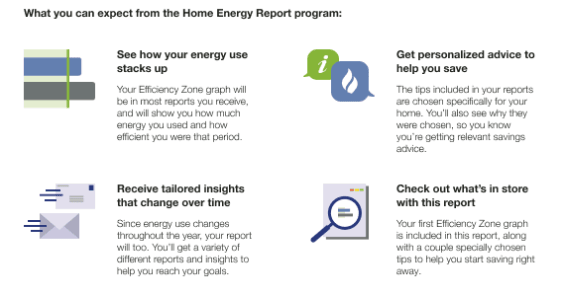
- Feature Heading: A primary feature heading that reemphasize the focus of the report. The heading varies slightly depending on whether the customer is new or legacy customer.
- Top Left Quadrant - Normative Comparison: This quadrant includes a headline explaining that the customer's energy use will be compared to others, along with a brief description of the normative comparison. The icon matches the type of normative comparison included in the customer's report.
- Bottom Left Quadrant - Variable Insight: This quadrant features a headline introducing personalized insights. The text explains that these insights will change throughout the year based on the customer's energy use.
- Top Right Quadrant - Tips: This quadrant includes a headline emphasizing energy-saving opportunities. The text explains that the tips are tailored to the customer and their home to provide relevant savings advice. The icon reflects the customer's fuel type.
- Bottom Right Quadrant - Where to Begin: This quadrant highlights that personalized insights are available on the back of the report. The text and icon reflect the customer's normative comparison type.
Limited Income Report
The Welcome Quadrant module in the Limited Income Report orients new customers to the four parts of the report experience: normative comparison, tips, variable insights, and how the report will help limited income customers reduce energy use and save money.
This image is an example of a Quadrant module included in the welcome version of the Limited Income Report.
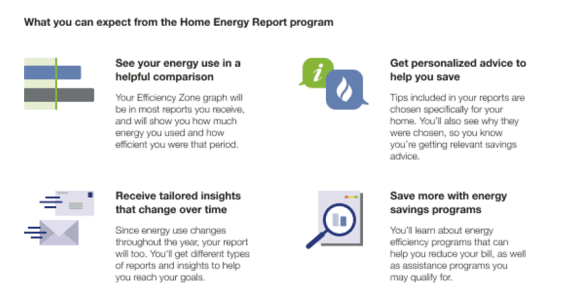
- Feature Heading: A primary heading that reinforces the focus of the report. The wording varies slightly depending on whether the customer is new or returning.
- Top Left Quadrant - Normative Comparison: This quadrant includes a headline explaining that the customer's energy use will be compared to others, along with a brief description of the normative comparison. The icon reflects the type of comparison shown in the report.
- Bottom Left Quadrant - Variable Insight: This quadrant features a headline introducing personalized insights. The text explains that these insights will change throughout the year based on the customer's energy use.
- Top Right Quadrant - Tips: This quadrant includes a headline highlighting energy-saving opportunities. The text explains that the tips are tailored to the customer and their home to provide relevant savings advice. The icon reflects the customer's fuel type.
- Bottom Right Quadrant - Where to Begin: This quadrant highlights that personalized insights are available on the back of the report, tailored for the limited income experience. The icon reflects the customer's normative comparison type. The text references this comparison and explains that the report can help customers learn about energy efficiency programs to reduce their bill, as well as assistance programs they may qualify for.
Time of Use Report
The Welcome Quadrant module included in the Time of Use Report educates new customers on the key features and benefits of the time of use report experience.
This image is an example of a welcome Quadrant module included in the Time of Use Report.
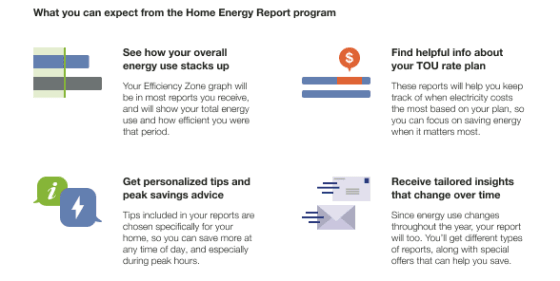
Primary Feature Heading: The default heading is "What you can expect from the Home Energy Report program."
Top Left Quadrant - Normative Comparison: This quadrant includes a headline explaining that the customer's energy use will be compared to others, along with an overview of the Efficiency Zone module and how it benefits the customer. The icon reflects the type of normative comparison shown in the report.
Bottom Left Quadrant - Where to Begin: This quadrant explains that the welcome report includes a normative comparison, insights, and tips to help the customer start saving energy. The icon reflects the customer's fuel type.
Top Right Quadrant - Time of Use Plan: This quadrant includes a headline explaining that the report takes the customer's time-of-use plan into account and helps them save energy when it matters most.
Bottom Right Quadrant - Variable Insight: This quadrant features a headline introducing personalized insights. The text explains that these insights will change throughout the year based on the customer's energy use.
Solar Report
The Welcome Quadrant module included in the Solar Welcome Report educates new customers on the key features and benefits of the solar report experience.
This image is an example of the module included in the Solar Welcome Report.
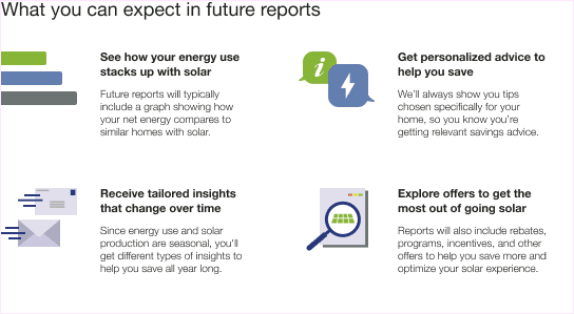
Primary Feature Heading: The default heading is "What you can expect in future reports."
Top Left Quadrant - Normative Comparison: This quadrant includes a headline explaining that the customer's energy use will be compared to other solar customers, along with an overview of the Three-Bar Neighbor Comparison module and how it benefits the customer.
Bottom Left Quadrant - Tailored Insights: This quadrant highlights that the report includes personalized insights that change seasonally. The icon reflects the customer's fuel type.
Top Right Quadrant - Tips: This quadrant explains that the report includes tips specifically chosen for the customer's home..
Bottom Right Quadrant - Offers: This quadrant includes a headline explaining that the report features rebates, programs, incentives, and other offers to help the customer save more and get the most out of their solar experience.
Peak Focused Report
The Welcome Quadrant module included in the Peak Focused Report educates new customers on the key features and benefits of the Time of Use report experience, with a focus on high-cost peak periods.
This image is an example of the module included in the Peak Focused Report.
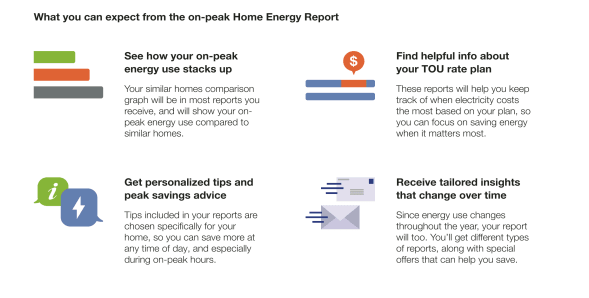
Primary Feature Heading: The default heading is "What you can expect from the Home Energy Report program."
Top Left Quadrant - Normative Comparison: This quadrant includes a headline explaining that the customer's energy use will be compared to others, along with an overview of the Peak Focused Normative Comparison and how it benefits the customer. The icon reflects the type of normative comparison shown in the report.
Bottom Left Quadrant - Where to begin: This quadrant explains that the welcome report includes a normative comparison, insights, and tips to help the customer start saving. The icon reflects the customer's fuel type.
Top Right Quadrant - Time of Use plan: This quadrant includes a headline explaining that the report takes the customer's time of use plan into account and helps them save energy when it matters most.
Bottom Right Quadrant - Variable Insight: This quadrant features a headline introducing personalized insights. The text explains that these insights will change throughout the year based on the customer's energy use.
User Experience Variations
Customer Type
- Legacy Customers: Customers who have received earlier versions of the report are considered legacy customers. Their feature heading acknowledges updates to the program: "What you can expect from the new Home Energy Report program."
- New Customers: Customers who have not previously received a Home Energy Report are considered new customers. Their feature heading introduces the program: "What you can expect from the Home Energy Report program."
Normative Comparison Type
- Top Left Quadrant - Normative Comparison: The text and image match the Normative Comparisons included in the customer's report experience.
- Bottom Right Quadrant - Where to Begin: The quadrant text and icon reflects the customer's normative comparison type.
Fuel Type
- Top Right Quadrant - Tips: The top right tips quadrant icon reflects the customer's fuel type.
- Blank Slot: Utilities have the option of replacing the Quadrant module with a custom module created by the Client Design team. The custom module must fit the primary feature specifications.
Welcome Quadrant Placement
The Welcome Quadrant can be placed on the front or back of the Welcome Report, Limited Income Report, Peak Focused Report, and Solar Report. When the Welcome Quadrant appears on the back of the report, the Normative Comparisons appears on the front of the report.