4 How to Enable Cloud
This chapter lists the tasks to be performed to enable your IaaS or PaaS Cloud. It contains the following sections:
4.1 Enterprise Manager Cloud Deployment Models
Figure 4-1 shows the cloud deployment models supported by Enterprise Manager.
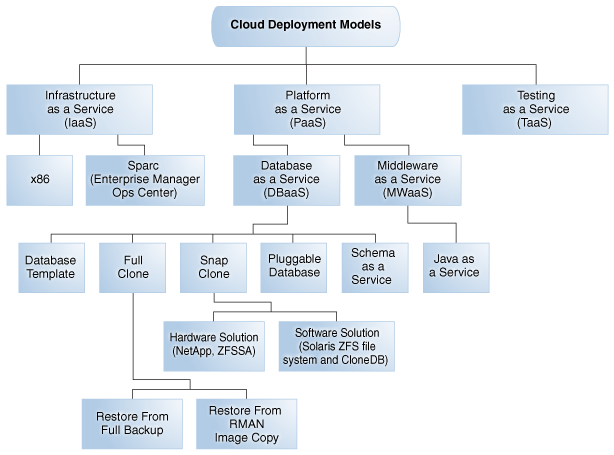
The sections below list the tasks that need to be performed to set up and use the various cloud deployment models. Apart from these tasks, you must also ensure that the correct plugins have been deployed. For more details on the plugins required, see Supported Plug-ins.
4.2 Enabling Infrastructure as a Service (IaaS)
This section describes the tasks that need to be performed by users with the Super Administrator, EM_CLOUD_ADMINISTRATOR, EM_SSA_ADMINISTRATOR, and EM_SSA_USER roles to setup and use IaaS.
4.2.1 Infrastructure as a Service (IaaS): Super Administrator Tasks
This section lists the tasks that can be performed by the Super Administrator.
4.2.2 Infrastructure as a Service (IaaS): Cloud Administrator Tasks
This section lists the tasks that can be performed for IaaS by users with the EM_CLOUD_ADMINISTRATOR role.
Table 4-2 Cloud Administrator Tasks (IaaS)
| Cloud Service Model | Usecase |
|---|---|
|
Infrastructure as a Service (IaaS) |
|
|
Chargeback |
|
|
Consolidation Planner |
4.2.3 Infrastructure as a Service (IaaS): Self Service Administrator Tasks
This section lists the tasks that need to be performed for IaaS by users with the EM_SSA_ADMINISTRATOR role.
4.2.4 Infrastructure as a Service (IaaS): Self Service User Tasks
This section lists the tasks that can be performed for IaaS by users with the following roles:
-
EM_SSA_USER: Users with this role, by default, can only access the Self Service Portal and all the service families. -
EM_SSA_USER_BASE: Users with this role can access the Self Service Portal but will not have access to any service family. Access to a specific IaaS service family must to be explicitly granted to the users with this role. See Section 3.3.1.3, "Creating a Custom Role Based on the EM_SSA_USER_BASE Role" for details.
4.3 Enabling Platform as a Service (PaaS)
This section describes the tasks that need to be performed by users with the Super Administrator, EM_CLOUD_ADMINISTRATOR, EM_SSA_ADMINISTRATOR, and EM_SSA_USER roles to setup and use PaaS.
4.3.1 Platform as a Service (PaaS): Super Administrator Tasks
This section lists the tasks that need to be performed for PaaS by users with the Super Administrator role.
4.3.2 Platform as a Service (PaaS): Cloud Administrator Tasks
This section lists the tasks that need to be performed for PaaS by users with the EM_CLOUD_ADMINISTRATOR role.
4.3.3 Platform as a Service (PaaS): Storage Administrator Tasks
This section lists the tasks that need to be performed for PaaS by users with the EM_STORAGE_ADMINISTRATOR role.
4.4 Enabling Database as a Service
Note:
Before you enable Database as a Service, you must have performed the tasks listed in Section 4.3, "Enabling Platform as a Service (PaaS)".This section describes the tasks that need to be performed to enable the different Database as a Service (DBaaS) options:
4.4.1 Provisioning Database Artifacts
This section describes the following:
4.4.1.1 Creating Databases Using Database Template
This section lists the tasks that need to be performed to create new databases using the Database Template.
4.4.1.2 Creating Schemas
This section lists the tasks that need to be performed to provision new schemas.
Table 4-11 SSA Administrator Tasks (Schema)
| User Role | Usecase |
|---|---|
|
|
|
4.4.1.3 Provisioning Pluggable Databases
This section lists the tasks that need to performed to provision pluggable databases
Table 4-13 SSA Administrator Tasks (Pluggable Databases)
| User Role | Usecase |
|---|---|
|
|
|
4.4.2 Cloning Databases
This section describes the following:
4.4.2.1 Creating Full Clones
This section describes the following:
4.4.2.1.1 Creating Full Clones Using RMAN Backup
This section lists the steps that need to be performed to create full clones using RMAN Backup.
Table 4-15 SSA Administrator Tasks (Creating Full Clones Using RMAN Backup
| User Role | Usecase |
|---|---|
|
|
4.4.2.1.2 Creating Full Clones Using RMAN Duplicate
This section lists the steps that need to be performed to create full clones using RMAN Duplicate.
Table 4-17 SSA Administrator Tasks (Creating Full Clones Using RMAN Duplicate
| User Role | Usecase |
|---|---|
|
|
4.4.2.2 Creating Snap Clones
This section describes the following:
4.4.2.2.1 Creating Snap Clones from the Cloning Dashboard
This section lists the steps that need to be performed to create and refresh snap clone databases from the Cloning Dashboard. The steps are:
4.4.2.2.2 Creating Snap Clones from an In-Sync Test Master
This section lists the steps that need to be performed to create snap clones from an in-sync test master.
Table 4-19 SSA Administrator Tasks (Snap Clones from In-Sync Test Master)
| User Role | Usecase |
|---|---|
|
|
|
4.4.2.2.3 Creating Snap Clones from a Discretely Synchronized Test Master
This section lists the steps that need to be performed to create snap clones from a discretely synchronized test master.
Table 4-21 SSA Administrator Tasks (Snap Clones - Discrete Sync)
| User Role | Usecase |
|---|---|
|
|
4.4.2.2.4 Ongoing Refresh of the Test Master and the Database Instance
To ensure that the test master has the latest production data and the database instance reflects the latest information, the following steps must be performed:
4.4.2.2.5 Creating CloneDB Databases
This section lists the steps that need to be performed to create a CloneDB database.
Table 4-23 SSA Administrator Tasks (Snap Clones - Discrete Sync)
| User Role | Usecase |
|---|---|
|
|
4.4.2.3 Creating Snap Clones for Pluggable Databases
This section lists the different solutions available in creating a test master pluggable database and snapshot clones of pluggable databases.
4.5 Enabling Middleware as a Service (MWaaS)
Note:
Before you enable Middleware as a Service, you must have performed the tasks listed in Section 4.3, "Enabling Platform as a Service (PaaS)".This section describes the tasks that need to be performed by users with the EM_CLOUD_ADMINISTRATOR, EM_SSA_ADMINISTRATOR, and EM_SSA_USER roles to setup and use MWaaS.
4.5.1 Middleware as a Service (MWaaS): Cloud Administrator Tasks
This section lists the tasks that need to be performed for MWaaS by users with the EM_CLOUD_ADMINISTRATOR role.
4.5.2 Middleware as a Service (MWaaS): Self Service Administrator Tasks
This section lists the tasks that need to be performed for MWaaS by users with the EM_SSA_ADMINISTRATOR role.
4.5.3 Middleware as a Service (MWaaS): Self Service User Tasks
This section lists the tasks that need to be performed for MWaaS by users with either of the following roles:
-
EM_SSA_USER: Users with this role, by default, can only access the Self Service Portal and all the service families.
-
EM_SSA_USER_BASE: Users with this role can access the Self Service Portal but will not have access to any service family. Access the MWaaS service family must to be explicitly granted to the users with this role. See Section 3.3.1.3, "Creating a Custom Role Based on the EM_SSA_USER_BASE Role" for details.
4.6 Enabling Testing as a Service (TaaS)
This section describes the tasks that need to be performed by users with the EM_CLOUD_ADMINISTRATOR, EM_SSA_ADMINISTRATOR, and EM_SSA_USER roles to setup and use TaaS.
4.6.1 Testing as a Service (TaaS): Cloud Administrator Tasks
This section lists the tasks that need to be performed for TaaS by users with the EM_CLOUD_ADMINISTRATOR role.
4.6.2 Testing as a Service (TaaS): Self Service Administrator Tasks
This section lists the tasks that need to be performed for TaaS by users with the EM_SSA_ADMINISTRATOR.
4.6.3 Testing as a Service (TaaS): Self Service User Tasks
This section lists the tasks that need to be performed for TaaS by users with either of the following roles:
-
EM_SSA_USER: Users with this role, by default, can only access the Self Service Portal and all the service families.
-
EM_SSA_USER_BASE: Users with this role can access the Self Service Portal but will not have access to any service family. Access to a the TaaS service family must to be explicitly granted to the users with this role. See Section 3.3.1.3, "Creating a Custom Role Based on the EM_SSA_USER_BASE Role" for details.