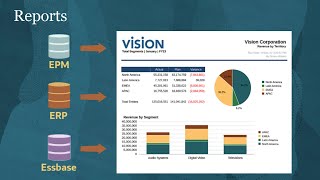
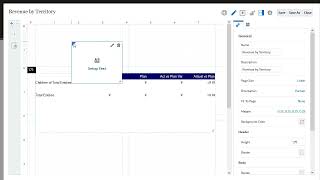
Home Cloud Cloud Applications Enterprise Performance Reporting Cloud Service Oracle Cloud EPM Narrative Reporting Videos Google might require you to sign in before you can watch videos hosted on YouTube. For more information, refer to this FAQ. Tour of Cloud EPM (4:40) Learn what Oracle Cloud Enterprise Performance Management and its business processes can do to benefit your organization. If your organization is thinking of implementing or migrating to Cloud EPM, consider creating a Cloud EPM Center of Excellence to manage your cloud transformation process.For more information, see the documentation.Related videos:Tour of Planning in EPM Standard CloudTour of Planning in EPM Enterprise CloudTour of Narrative ReportingTour of Financial Consolidation and CloseTour of Account ReconciliationTour of Enterprise Data Management Tour of Enterprise Profitability and Cost ManagementTour of Tax Reporting Tour of Narrative Reporting in Cloud EPM (3:06) This overview describes how you can collaboratively create, manage, and publish integrated financial, regulatory, and management reports using report packages and management reporting.For more information, see the documentation.Related videos:Overview: Report Packages in Narrative Reporting Part IOverview: Report Packages in Narrative Reporting Part IIManaging Report PackagesCreating Reports Overview: Report Packages in Narrative Reporting Part I (4:14) Describes what report packages are, how they resolve common collaborative reporting challenges, and how they're developed.For more information, see the documentation.Related videos:Getting Started With Report Packages in Smart View for Office.Creating the Report Package Structure in Narrative Reporting.Authoring and Approving Doclets in Narrative Reporting. Overview: Report Packages in Narrative Reporting Part II (5:30) This video describes how to set up a report package and identifies the benefits of the three development phases.For more information, see the documentation.Related videos:Getting Started With Report Packages in Smart View for Office.Creating the Report Package Structure in Narrative Reporting.Authoring and Approving Doclets in Narrative Reporting. Creating the Report Package Structure (5:29) Learn how to create a report package, enable report package phases, assign users and responsibilities, and define report package options in Narrative Reporting.For more information, see the documentation.Related videos:Overview: Report Packages in Narrative Reporting Part IOverview: Report Packages in Narrative Reporting Part II Managing Report Packages (4:24) In this video, report package owners learn how to manage the Report Package through its development phases.For more information, see the documentation.Related video:Managing Content in Report Packages in Narrative Reporting. Setting Up Smart View for Oracle Cloud EPM (7:02) In this tutorial, you learn how to install Oracle Smart View for Office, how to create connections to data sources, and how to install data source-specific extensions.For more information, see the documentation.Related video:Getting Started With Report Packages in Smart View for Office Working with Microsoft Word Style Samples (2:19) Learn how to use Microsoft Word style samples to unify the look of doclets in a report package.For more information, see the documentation.Related tutorial:Working With Microsoft PowerPoint Style Samples Getting Started With Report Packages in Smart View for Office (3:33) Learn how to accelerate report package development by defining and modifying report package structures in Microsoft Office using your day-to-day tools and Office-based processes.For more information, see the documentation.Related video:Setting up Smart View. Working with Microsoft PowerPoint Style Samples (5:13) Learn how to use Microsoft PowerPoint style samples to unify the look of doclets in a report package.For more information, see the documentation.Related videos:Working with Microsoft Word Style Samples Working with PDF-Based Report Packages (5:05) Learn how to work with PDF-based report packages in Narrative Reporting.For more information, see the documentation.Related videos:Creating the Report Package StructureDistributing Report Packages Overview: Cloud EPM Standard or Cloud EPM Enterprise (4:14) This overview highlights the differences between the two EPM Cloud offerings: EPM Standard Cloud and EPM Enterprise Cloud.For more information, see the documentation.Related videos:Tour of EPM Cloud Tour of Planning in EPM Standard CloudTour of Planning in EPM Enterprise Cloud Managing Content in Report Packages (5:24) Learn how to add doclets and Table of Content doclets to report packages, assign responsibilities to doclets, arrange doclets in the report package, and add organizational sections.For more information, see the documentation.Related videos:Managing Report PackagesCreating the Report Package StructureManaging Supplemental Doclets Managing Supplemental Doclets (4:32) Learn how to add and organize supplemental doclets for report packages in Narrative Reporting. It also demonstrates how to author, approve, and view supplemental doclets in Narrative Reporting and Smart View.For more information, see the documentation.Related videos:Managing Report PackagesCreating the Report Package Structure in Narrative ReportingManaging Content in Report Packages Changing Member Selections in Smart View Queries with Report Package Variables (3:00) In this video, you learn how to use report package variables to control POV selection in Smart View based queries in reference doclets in Narrative Reporting.For more information, see the documentation.Related videos:Creating and Managing Variables in Report PackagesInserting Variables Into DocletsUsing Variables for Directional Text and Cross Footing Distributing Report Packages (4:53) In this video, you learn how to distribute report packages in Narrative Reporting.For more information, see the documentation.Related videos:Creating the Report Package Structure in Narrative ReportingWorking with PDF-Based Report Packages Authoring and Approving Doclets (4:59) Learn how to author and approve doclets in the Narrative Reporting Web interface.For more information, see the documentation.Related videos:Creating and Authoring Reference DocletsReviewing Report Package ContentSigning Off on Report Packages Authoring and Approving Microsoft Word-Based Doclets in Smart View (3:41) Learn how to author and approve Microsoft Word-based doclets for Narrative Reporting in Smart View.For more information, see the documentation.Related videos:Reviewing Microsoft Word-Based Report Package Content in Smart ViewSigning Off on Microsoft Word-Based Report Packages in Smart View Authoring and Approving Microsoft PowerPoint-Based Doclets in Smart View (3:33) Learn how to author and approve Microsoft PowerPoint-Based doclets in Smart View in Narrative Reporting.For more information, see the documentation.Related videos:Reviewing Microsoft PowerPoint-Based Report Package Content in Smart ViewSigning off on Microsoft PowerPoint-Based Report Packages in Smart View Creating and Authoring Reference Doclets in Narrative Reporting (4:12) Learn how to create and author Report and Excel reference doclets in Oracle Fusion Cloud EPM Narrative Reporting. See how reference doclet authors make reusable Report and Excel content available for doclet authors to add to their assigned doclets.For more information, see the documentation.Related video:Embedding Content from Reference Doclets and Reference Files Embedding Content from Reference Doclets and Reference Files (6:52) In this video, you learn how to embed report content from reference doclets and reference files in Narrative Reporting.For more information, see the documentation.Related video:Creating and Authoring Reference Doclets Creating and Managing Variables in Report Packages (5:00) Learn how to create, edit, inspect, and delete variables in report packages using the Web interface and Smart View.For more information, see the documentation.Related videos:Inserting Variables Into DocletsUsing Variables for Directional Text and Cross Footing Inserting Variables Into Doclets (3:08) Learn how to insert static variables and reference variables into doclets in Narrative Reporting.For more information, see the documentation.Related videos:Creating and Managing Variables in Report PackagesUsing Variables for Directional Text and Cross Footing Using Variables for Directional Text and Cross Footing (3:40) Learn how to use report package variables for directional text and cross footing verification in Narrative Reporting.For more information, see the documentation.Related videos:Creating and Managing Variables in Report PackagesInserting Variables Into Doclets Creating Basic Ad Hoc Reports in Smart View (5:21) In this tutorial, you’ll learn how to use Ad Hoc analysis in Oracle Smart View to analyze data and build reports by working with the POV, selecting members, pivoting dimensions, zooming, and customizing your grids.For more information, see the documentation.Related video:Creating Advanced Ad Hoc Reports in Smart View Creating Advanced Ad Hoc Reports in Smart View (4:17) In this tutorial, you learn how to use advanced ad hoc reporting techniques to create reports and analyze data in Smart View. In Smart View, you can set options to control how ad hoc actions are performed and how grids are displayed.For more information, see the documentation.Related video:Creating Basic Ad Hoc Reports in Smart View Capturing HTTPs Traffic for Smart View Using Fiddler (2:55) Learn how to use Fiddler to capture http(s) traffic for Smart View. After installing and configuring Fiddler, you can use it to capture trace information in relation to your current Smart View issues.For more information, see the documentation. Overview: Server-Initiated Refresh Using Smart View and Narrative Reporting (4:02) This is an overview of the server-initiated refresh feature in Narrative Reporting.For more information, see the documentation.Related tutorials:Creating and Authoring Reference DocletsEmbedding Content from Reference Doclets and Reference Files Reviewing Report Package Content on the Web (3:32) In this tutorial, you learn how to create a review instance and start a review cycle on the report package content using the Narrative Reporting Web interface.For more information, see the documentation.Related videos:Authoring and Approving DocletsSigning Off on Report Packages Signing Off on Report Packages (1:41) Learn how to sign off on your completed report package in the Narrative Reporting Web interface.For more information, see the documentation.Related videos:Authoring and Approving DocletsReviewing Report Package Content Reviewing Microsoft Word-Based Report Package Content in Smart View (1:34) Learn how to review Microsoft Word-based report package content in Smart View in Narrative Reporting.For more information, see the documentation.Related videos:Authoring and Approving Microsoft Word-Based Doclets in Smart ViewSigning Off on Microsoft Word-Based Report Packages in Smart View Signing Off on Microsoft Word-Based Report Packages in Smart View (1:06) Learn how to sign off on Microsoft Word-based report packages in Smart View in Narrative Reporting.For more information, see the documentation.Related videos:Authoring and Approving Microsoft Word-Based Doclets in Smart ViewReviewing Microsoft Word-Based Report Package Content in Smart View Reviewing Microsoft PowerPoint-Based Report Package Content in Smart View (1:51) Learn how to review Microsoft PowerPoint-based report package content for Narrative Reporting in Smart View.For more information, see the documentation.Related videos:Authoring and Approving Microsoft PowerPoint-Based Doclets in Smart ViewSigning off on Microsoft PowerPoint-Based Report Packages in Smart View Signing off on Microsoft PowerPoint-Based Report Packages in Smart View (1:20) Learn how to sign off on Microsoft PowerPoint-Based report packages in Smart View.For more information, see the documentation.Related videos:Authoring and Approving Microsoft PowerPoint-Based Doclets in Smart ViewReviewing Microsoft PowerPoint-Based Report Package Content in Smart View Comparing Reviews In Report Packages (1:47) Learn how to compare multiple review cycles of a report package in Narrative Reporting.For more information, see the documentation.Related videos:Reviewing Report Package ContentOverview: Report Packages in Narrative Reporting Part IOverview: Report Packages in Narrative Reporting Part II Introducing GenAI Capabilities in Narrative Reporting (4:30) Learn about GenAI capabilities in Narrative Reporting. Design reports using conditional text and the AutoTextSummary that automatically renders a corresponding narrative using the Reports GenAI feature. Overview: Report Bursting in Narrative Reporting (5:05) This video orients you with the report bursting, a capability enabling you to run a report or book for multiple members in the same dimension, publish the output for each member as an Excel or PDF, and distribute the output to different recipients by email or publication in the Library.For more information, see the documentation.Related video:Creating Bursting Definitions. Overview: Books in Narrative Reporting (3:42) This video orients you with how to create and use books in Narrative Reporting. With books you can compile reports, other books, and other documents in a single Excel or PDF, such a divisional financial report book, for more organized and streamlined reporting and analysis.For more information, see the documentation.Related Tutorials:Working With Book SectionsCreating Books Overview: Reports (5:26) This overview introduces you to the key features and capabilities of Reports in Narrative Reporting. Reports allows you to create comprehensive, dynamic, and integrated reports by using a report designer to insert and format report objects, such as grids and charts, to present data from Cloud EPM, Cloud ERP and Essbase cloud data sources.For more information, see the documentation.Related videos:Creating ReportsViewing and Interacting with Reports Creating Reports (5:18) Learn how to create and build reports in Narrative Reporting by adding objects to the report, designing grids, adding formulas and formatting, and previewing reports.For more information, see the documentation.Related videos:Overview: ReportsAdding Objects to ReportsViewing and Interacting with ReportsDefining Prompts in Management Reports Adding Objects to Reports (4:39) Learn how to add objects to reports in Narrative Reporting. Report objects include grids, charts, text boxes, images, notes, and shared objects.For more information, see the documentation.Related videos:Overview: ReportsCreating ReportsCreating ChartsDefining Prompts in Management Reports Creating Charts (3:54) Learn how to create charts in Narrative Reporting. A chart is a graphical representation of report data from a grid on a report. You can use the different chart types to illustrate trends and tendencies or to highlight differences and improvements.For more information, see the documentation.Related videos:Overview: ReportsCreating ReportsAdding Objects to Reports Inserting Report Objects into Doclets (5:26) Learn how insert a report as a reference doclet in a report package, which then allows you to embed grid and chart content into doclets.For more information, see the documentation.Related videos:Overview: ReportsCreating ReportsCreating and Authoring Reference Doclets Viewing and Interacting with Reports (4:52)Learn how to view and interact with reports that have been shared by report designers.For more information, see the documentation.Related videos:Overview: ReportsZooming on Parent Members in Management Report GridsDrilling to Content in Management Report GridsCreating Notes in Management Reporting Defining Prompts in Reports (4:44) Learn how to define prompts to select members in reports for Narrative Reporting.For more information, see the documentation.Related videos:Overview: ReportsCreating Reports Applying Conditional Formatting and Suppression in Management Reports (5:13) Learn how to apply conditional formatting and suppression to management reports in Narrative Reporting.For more information, see the documentation.Related videos:Overview: ReportsCreating ReportsViewing and Interacting with ReportsApplying Conditional Text to Management Reports Zooming on Parent Members in Management Report Grids (5:23) Learn how to zoom on parent members in management report grids in Narrative Reporting.For more information, see the documentation.Related videos:Overview: ReportsCreating ReportsViewing and Interacting with ReportsDrilling to Content in Management Report Grids Drilling to Content in Management Report Grids (4:40) Learn how to drill to content in management report grids in Narrative Reporting.For more information, see the documentation.Related videos:Overview: ReportsCreating ReportsViewing and Interacting with ReportsZooming on Parent Members in Management Report Grids Creating and Managing Note Templates (5:40) Learn how to create and manage note templates in Narrative Reporting.For more information, see the documentation.Related videos:Overview: ReportsCreating ReportsCreating Notes in Management Reporting Creating Notes in Management Reporting (2:38) Learn how to create notes in management reporting in Narrative Reporting.For more information, see the documentation.Related videos:Overview: ReportsCreating ReportsCreating and Managing Note Templates Applying Conditional Text to Management Reports (4:03) Learn how to apply conditional text to management reports in Narrative Reporting.For more information, see the documentation.Related videos:Overview: ReportsCreating ReportsApplying Conditional Formatting and Suppression in Management Reports Creating Books (7:35) Learn how to create books to group together one or more management reports, books, and other documents, to generate a single PDF or Excel output.For more information, see the documentation.Related video:Working with Book Sections Working with Book Sections in Narrative Reporting (4:29) Learn how to use sections in books to loop through multiple reports and member selections, and group reports at one level for your table of contents display.For more information, see the documentation.Related video:Creating Books Grouping Dimensions in Grids (8:25) Learn how to use grouping in grids to calculate, group and format nested dimensions in a row or column data segment.For more information, see the documentation.Related videos:Overview: ReportsCreating ReportsApplying Conditional Formatting and Suppression in Management Reports Creating Bursting Definitions (8:41) Learn how to create bursting definitions, which define all the required selections and settings to generate and distribute PDF or Excel output of a report or book with the desired POV member selections.For more information, see the documentation.Related videos:Overview: ReportsCreating Reports Exploring New Features in Reports (Feb/March 2021) (6:02) Explore new features in Oracle EPM Reports for the February/March 2021 release.For more information, see the documentation.Related videos:Overview: ReportsCreating Reports Setting Up the Inline Grid Entry of Notes (6:15) Learn how to set up the inline grid entry of notes in Narrative Reporting.For more information, see the documentation.Related videos:Creating and Managing Note TemplatesCreating Notes in Management Reporting Working with Connections and Remote Libraries (3:23) Learn how to configure and work with connections and remote libraries in Narrative Reporting.For more information, see the documentation.Related videos:Viewing and Interacting with ReportsCreating Reports Using the Notes Text Function (8:01) Learn how to use the Notes text function to display notes in a data source-enabled text box in a report.For more information, see the documentation.Related video:Creating and Managing Note TemplatesCreating Notes in Management ReportingSetting Up the Inline Grid Entry of Notes Overview: Security and Roles in Oracle Cloud EPM (3:31) In this overview, you’ll learn about how Oracle Cloud EPM uses single sign-on, application roles, granular roles, groups, and Access Control to secure environments. See how administrators manage user access and apply business-process permissions across Cloud EPM services.For more information, see the documentation. Managing Users and Assigning Roles in Oracle Identity and Access Management (6:20) Learn how Identity Domain Administrators manage users and assign predefined roles to users in Oracle Identity and Access Management (IAM).For more information, see the documentation.Related video:Overview: Security and Roles in Oracle Cloud EPM Managing Users and Assigning Roles in Oracle Cloud Identity Console (5:40) Learn how Identity Domain Administrators manage users and assign predefined roles to users in Oracle Cloud Identity Console (IDCS).For more information, see the documentation.Related video:Overview: Security and Roles in Oracle Cloud EPM Granting Access to Library Artifacts (3:56) Learn how to grant access to library artifacts in Narrative Reporting.For more information, see the documentation.Related videos:Overview: Security and Roles in Oracle Cloud EPMCreating Data Grants Overview: Performance Testing With The EPM Automate Replay Command (3:41) For Administrators, this video describes how to use the EPM Automate replay command to identify any concurrency-related performance issues in a test environment under heavy load. This helps administrators resolve any performance issues before migrating applications to production.For more information, see the documentation. Creating Data Grants (3:27) Learn how to create data grants that enable administrators to apply a level of security to the data stored in a Narrative Reporting model.For more information, see the documentation.Related videos:Overview: Security and Roles in Oracle Cloud EPMGranting Access to Library Artifacts Overview: Embedding Content Using Direct Links (5:03) Use direct links to embed ERP-EPM Cloud, Sales Planning Cloud and Strategic Workforce Planning Cloud artifacts in other source system pages. This enhances your existing processes with functionally-tailored workflow, forms, grids, reports, and dashboards and provides seamless cross-system interaction from a unified interface.For more information, see the documentation. Overview: Integrating Oracle Cloud ERP with Oracle Cloud EPM (4:40) For administrators, this overview highlights the requirements and tasks you need to complete when integrating Oracle Fusion Cloud ERP with Oracle Cloud EPM using prepackaged extracts.For more information, see the documentation. Overview: Configure Navigation Flows to Integrate Business Processes (3:51) This video describes how Administrators can optimize the home pages of different business users whose activities span business processes by defining custom navigation flows and infolets.This tailors a user’s home page given their responsibilities, giving them rapid access to the capabilities and artifacts that they use the most for optimal efficiency.For more information, see the documentation. Overview: User Assistance Assets for EPM Cloud (3:38) This overview shows you the types of user assistance available for Oracle EPM Cloud.For more information, see the documentation.Related videos:Help Diagnose Your Issue Faster Using Provide Feedback Part IHelp Diagnose Your Issue Faster Using Provide Feedback Part 2 Overview: Get Answers, Learn More, and Stay Current With the Help Center (5:20) Identifies the different ways you can get situation-specific help with Oracle Cloud Applications. In addition to embedded, context sensitive help in the product, visit the Help Center for functionally-tailored documentation, training, tasks, videos and tutorials and readiness resources.For more information, see the documentation.Related video:User Assistance Assets for EPM Cloud. Overview: Help Diagnose Your Issue Faster Using Provide Feedback (Part I) (3:45) Learn about the information that Support needs you to submit using Provide Feedback.For more information, see the documentation.Related video:Overview: Help Diagnose Your Issue Faster Using Provide Feedback (Part II) Overview: Help Diagnose Your Issue Faster Using Provide Feedback (Part II) (4:00) Learn how to gather the information Support needs using Provide Feedback and then create an effective service request.For more information, see the documentation.Related video:Overview: Help Diagnose Your Issue Faster Using Provide Feedback (Part I) Overview: EPM Center of Excellence (4:23) Learn what a Cloud EPM Center of Excellence is, and what the key benefits of creating one are to your organization, supporting your cloud adoption and sharing of best practices, and driving business process transformation.For more information, see the documentation.Related video:Creating an EPM Center of Excellence Creating an EPM Center of Excellence (6:30) Every journey to the cloud is different, and implementation strategies for Cloud EPM vary. Learn how to create an EPM Center of Excellence in stages. These stages contain general guidelines that you can adapt to your organization’s needs so you can start small and grow organically.For more information, see the documentation.Related video:Overview: EPM Center of Excellence