Example Summary Search Custom Field
This example describes at a high level how to display a calculated total on a custom purchase order form.
A purchase order saved search calculates the sum of Amount values for purchase order line items. The custom field displays that total for the purchase order currently open on the form.
For general information about creating custom fields from summary search results, see Creating Custom Fields with Values Derived from Summary Search Results.
To create the custom field:
-
Create a purchase order saved search. For more information, see Defining a Saved Search.
-
On the Criteria subtab, add the Main Line is No criterion. This criterion limits the search to purchase order lines.
-
On the Results subtab, add the Amount field. Set its Summary Type to Sum.
-
In the Filter field on the Available Filters subtab, add Internal ID.
-
Save the search with a descriptive name, such as Total Purchase Order Amount.
-
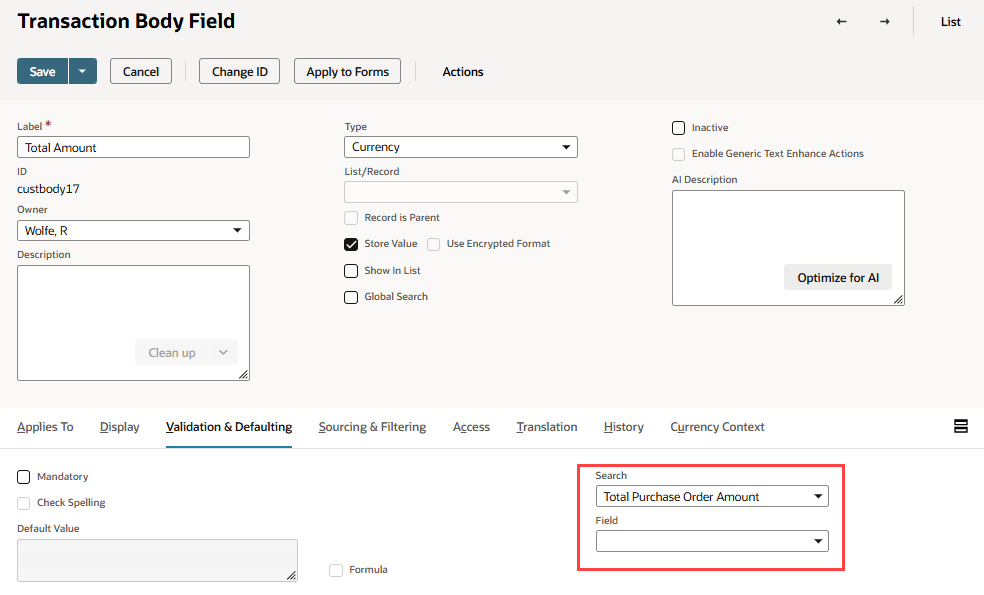
Create a transaction body custom field with these values:
-
Label: Total Amount
-
Type: Currency
-
Applies To: Purchase
For more information, see Creating a Custom Field.
-
-
In the Search field on the Validation & Defaulting subtab, select Total Purchase Order Amount. For more information, see Setting Validation and Defaulting Properties.
-
Leave Field empty. You don't need a Compare To field because the saved search and custom field use purchase order records.
-
In the Main section, clear the Store Value box. Summary search custom field values are calculated when the form displays and are not stored. For more information, see Setting the Store Value Field.
For example, a purchase order has three line items with amounts of $125, $300, and $75. When a user opens that purchase order, the Total Amount field displays $500. The available filter limits the saved search to that purchase order.
The following image shows a transaction body field with the summary search information.