FSM Service Locations and Geocoding
Field Service Management (FSM) maintains the saved address and coordinates that identify where service work takes place. An asset can supply this location to a CRM task or project task. Geocoding looks up an address to obtain latitude and longitude. Background processing applies later asset location changes to eligible work.
How It Works
The primary customer supplies address-book choices, and the asset stores the service address and coordinates. A linked task or project task receives the asset's location. A task without a linked asset can use its own Field Service Address and coordinates.
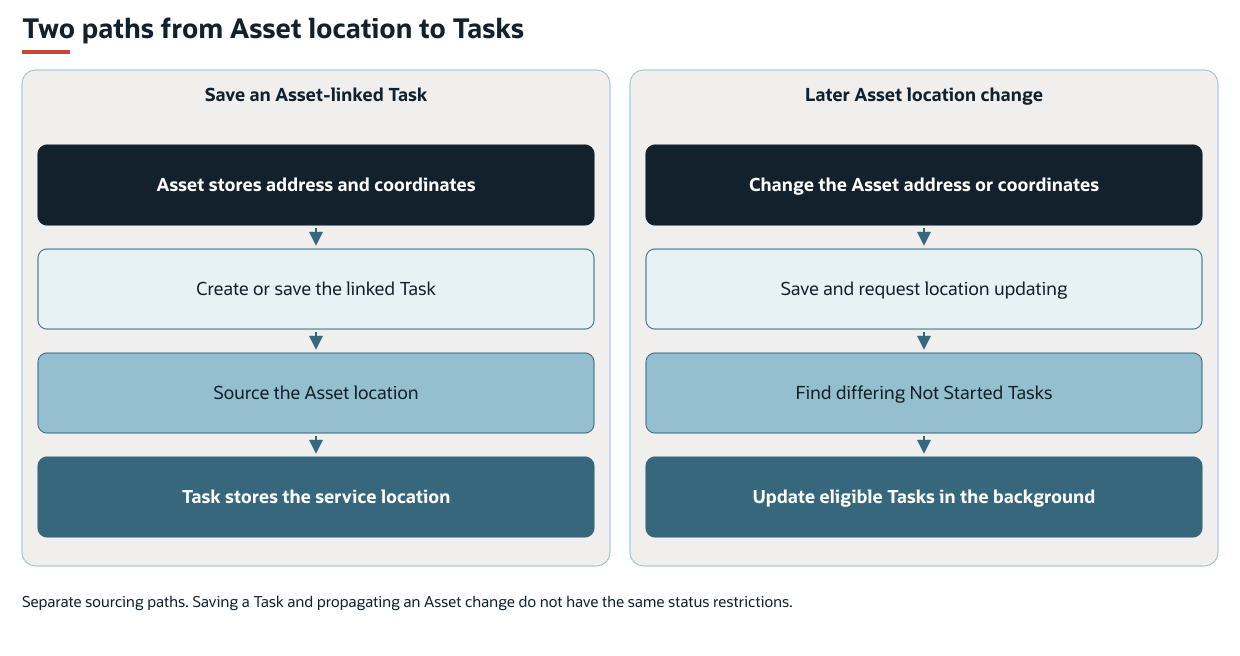
The following diagram compares location sourcing when a linked task is saved with propagation of a later asset location change:
Address selection, address search, and geocoding perform different jobs:
-
Address Select chooses an address from the asset's primary customer address book and supplies the asset's address text.
-
Address Search, when available on the asset form, offers address suggestions. Selecting a suggestion supplies address text and clears the address-book selection.
-
Geocoding calculates coordinates from address text when automatic address lookup is enabled and its service dependencies are available.
An address is descriptive text. Latitude and longitude identify its geographic position. Entering an address does not by itself confirm that a lookup succeeded or that the saved coordinates represent the intended site. Automatic address lookup is enabled by default, subject to the account's service setup.
The saved service location is separate from a technician's current device location. FSM Maps, Geo-location and Tracking explains how task and employee coordinates are displayed and used for navigation and tracking.
Key Behaviors
This section describes how the feature responds to different conditions and actions.
Asset Address Sources
An asset has a single Customer field and a separate Customers field that supports multiple selections. Address Select offers address-book entries from the primary Customer field only. Selecting additional customers in Customers does not add their addresses to Address Select.
When an asset has an address-book selection, FSM refreshes its address text from the selected customer address. Refreshing occurs during create or copy form loading and during create, copy, edit, or inline submission. A different address entered directly in Address Text can therefore be replaced when Address Select remains populated.
Changing Address Select on the standard asset form clears the previous address text, latitude, and longitude before applying the selected address. Address Search instead supplies the selected suggestion as address text and clears Address Select, so the former customer address is no longer the source of that text.
A child asset can receive address fields from its parent through inheritance. The default inherited fields include the Customer, address selection, address text, and Region. Latitude and longitude are not in that default list. See FSM Asset Hierarchy and Inheritance for inheritance behavior and supported changes.
Address-Based Coordinate Lookup
Automatic lookup behaves differently on assets and tasks. The following table describes lookup behavior when geocoding is enabled, the address is nonempty, and the required service is available.
|
Record and Situation |
Behavior |
|---|---|
|
Asset: address text changes on the form |
FSM requests coordinates for the changed address, including when previous coordinates are populated. Clearing old coordinates first is not required for this address-change lookup. |
|
Asset: create or copy form loads, or create or edit submission occurs with both coordinates empty |
FSM can request coordinates from the address. The empty-coordinate condition can apply even when coordinate values were explicitly cleared in the submission. |
|
Asset: create or edit submission changes the address with coordinates present, including an inline update |
FSM requests coordinates if neither latitude nor longitude changes in that submission. An explicit coordinate change prevents lookup under this address-change rule. |
|
CRM task or project task: Field Service Address changes on the form |
FSM requests coordinates for the changed address, including when previous coordinates are populated. |
|
CRM task or project task: create or copy form loads, or the form is saved |
FSM can request coordinates when both latitude and longitude are empty. Either populated coordinate prevents this particular lookup. |
|
CRM task or project task: create or edit submission outside the form, or an inline update |
FSM requests coordinates when the address changes and neither latitude nor longitude changes in the same submission. Merely having empty coordinates does not satisfy this submission rule. |
|
Any of these records: address is empty |
The address-geocoding handler performs no lookup and does not itself clear existing coordinates. Other address-selection or sourcing actions can still replace values. |
A usable lookup result updates latitude, longitude, and the combined Geolocation value. A lookup that returns no coordinates leaves the existing coordinate values unchanged through this handler. The address and coordinates can therefore describe different locations after an unsuccessful lookup.
Lookup processing can reuse a cached result for an address. A qualifying address change does not guarantee another request to the lookup service.
Location Copied from a Linked Asset
When Field Service Task Asset is populated, FSM copies the asset's address, latitude, and longitude onto the CRM task or project task. Copying occurs during create or copy loading, when the asset selection changes on the form, and when the form is saved. It also occurs during create, copy, edit, or inline submission outside the form.
This sourcing replaces task location values. It is not limited to filling empty fields. Save-time sourcing can replace an address or coordinates entered on the task with the selected asset's values. These save and selection rules do not have the background propagation rule's Not Started restriction.
The asset relationship can itself be sourced from related work. CRM tasks without a project can receive the case's asset. CRM tasks and project tasks linked to a project can receive that project's asset. Location copying then uses the resulting Task Asset relationship.
Clearing the Task Asset field does not itself clear the task's existing address or coordinates through this copying behavior.
Record Interactions
The following table describes the records that supply address information or store the saved service location. Field labels can vary by account. IDs identify the fields used by FSM.
|
Record |
Role in the Feature |
|---|---|
|
Customer |
The asset's primary customer supplies the address-book entries offered by Address Select. Customers selected in the separate Customers field that supports multiple selections do not supply address choices. |
|
Field service asset |
Stores Address Select ( |
|
CRM task and project task |
Use Field Service Task Asset ( |
|
Case and project |
Can supply the asset relationship used by related tasks. The asset location update described here updates tasks, rather than moving the case or project record. |
Asset-to-task copying updates address, latitude, and longitude. It does not copy the asset's combined Geolocation value as part of that location copy. Task maps and tracking use the task's separate latitude and longitude fields.
Coordinate sourcing can also affect asset time zone sourcing. For information about coordinate-related effects on time zones, see FSM Service Time Zone Sourcing and Synchronization.
Processing Model and Lifecycle
This section explains when processing occurs and what can affect its progress and results.
Propagating a Later Asset Location Change
During an edit or inline update, FSM checks for changes to an existing asset's address text, latitude, or longitude. A detected change marks the asset for location updating. A submission with pending location work requests the Field Service Scheduled : Asset deployment (customdeploy_nx_asset). The asset save and the later task updates are separate outcomes.
Background location processing selects CRM tasks linked to the asset with a Not Started status and an address or coordinates that differ from the asset. It also selects matching project tasks when NetSuite Project Management is enabled. Selected tasks receive the asset's current address, latitude, and longitude, including empty values where the asset no longer supplies a value.
Tasks that have started or completed are excluded from this background selection. This exclusion does not prevent the separate asset sourcing that occurs when a task is saved.
The asset's Update Location field (custrecord_nx_asset_location_update) identifies pending location work. It does not establish that a script is running. When the assessment finds no eligible tasks with differing location values for that asset, processing clears the flag. The asset form's Update Child Assets message can indicate available work from inheritance or task location updating. The message is not a location-specific completion indicator.
A matching unrecovered field service error record can cause a task update to be skipped. The task can remain different from its asset and continue to qualify for updating. If all selected actions are blocked by errors that are not eligible for retry, processing can stop with a Blocked result. Processing does not request another execution for that result. Other processing can also be delayed by outstanding actions. For information about shared execution limits, continuation, and error monitoring, see FSM Script Reference. For information about error data and state meanings, see Field Service Error Record.
Geocoding and Stored Geolocation
Address lookup occurs during the record interactions described in this topic. A service failure that raises an error can interrupt the lookup and prevent the associated save from completing. This differs from a lookup that completes without a coordinate result, which does not replace the coordinates through the geocoding handler.
The Field Service Scheduled : Geo deployment (customdeploy_nx_geo) separately maintains cached lookups and stored Geolocation data. Its migration fills missing Geolocation values from existing nonzero latitude and longitude on assets, CRM tasks, and project tasks. Project task maintenance depends on NetSuite Project Management being enabled. Migration is assessed after earlier maintenance work. It does not perform the initial address-to-coordinate lookup.
Expiration of a cached address lookup does not itself clear coordinates already stored on business records. Selection for migration does not establish that migration is running, and an execution ending does not establish that every record was updated. The resulting record values show the individual update outcome.
Configuration
For the supported settings, defaults, and examples, see Configuring FSM Service Locations and Geocoding.
Administrators can control automatic address-based coordinate sourcing separately from asset address suggestions. Turning off automatic geocoding stops the address lookups controlled by that setting. It does not clear existing coordinates or stop the separate copying of an asset's saved location onto a task.
For the automatic address-lookup control and its settings, see Configuring FSM Maps, Geo-location and Tracking. FSM NetSuite View Configuration describes the asset address selector, Address Search, and geocoding form components. For parent-to-child field choices, see Configuring FSM Asset Hierarchy and Inheritance.
Limitations and Constraints
The following limitations and constraints apply:
-
Address Select lists addresses from the asset's primary customer only. Addresses belonging to customers selected in the Customers field that supports multiple selections are not included.
-
Address suggestions and geocoding depend on the relevant feature, form, and service conditions. Availability of one does not establish availability of the other.
-
Stored address text and stored coordinates can differ. A failed or unsuccessful lookup does not guarantee replacement coordinates.
-
Having one coordinate can suppress an initialization or form-save lookup even though both valid coordinates are needed for a map position.
-
A later asset change does not update every historical task. Background propagation selects differing Not Started work. Save-time asset sourcing has separate rules.
-
A task linked to an asset can have manually entered location values replaced when saved, including after the task has started or completed.
Related Processes and Procedures
For information about creating the customer address and asset service site, see Setting up Customer Records and Assets for Field Service Management.
Related Topics
-
FSM Maps, Geo-location and Tracking
- FSM Asset Hierarchy and Inheritance
- Field Service Asset Records
- FSM Service Time Zone Sourcing and Synchronization
- FSM Script Reference