KPI Formulas
You can view the formulas used by the Subscription Metrics dashboards on the KPI Formulas tab of the Setup page. To view KPI formulas, go to Subscription Metrics > Setup, and click View.
Currently, only the CAC formula is editable. Users with the SaaS Metric permission can edit the formula.
To edit the CAC formula:
-
Log in to NetSuite.
-
On the Subscription Metrics tab, go to Setup, and click View.
-
On the KPI Formulas subtab, click the edit icon beside Customer Acquisition Cost (CAC).
-
In the Edit Formula popup window, select a dataset.
Note:Only datasets with a name that starts with SaaS are displayed on the list for selection. The CAC calculation is based on the selected dataset. For details, see SaaS Sales and Marketing Expenses Dataset.
-
Click Save.
SaaS Sales and Marketing Expenses Dataset
The SaaS Sales and Marketing Expenses Dataset provides default criterion and formula used to aggregate sales and marketing expenses for customer acquisition cost (CAC) calculations. The default formula takes 30% of expenses posted in Expenses and Other Expenses account types.
Customer Acquisition Cost = Sales and Marketing Expenses ÷ New Customers Acquired
Dataset Configuration
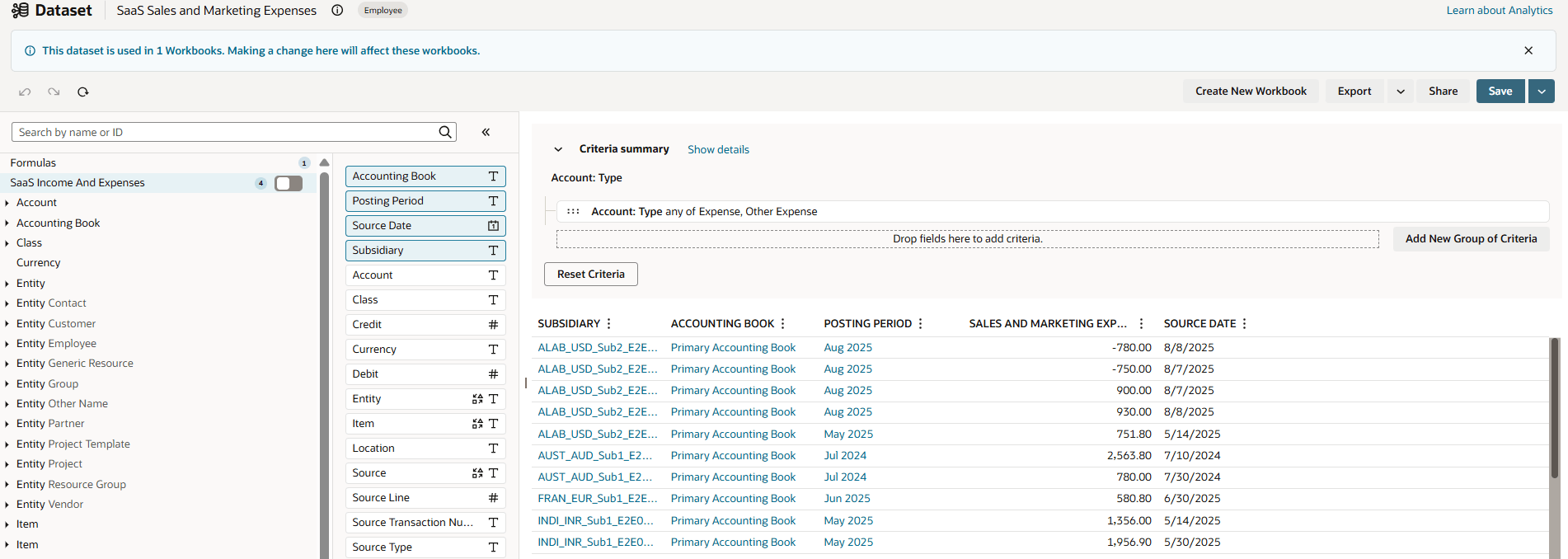
To find the dataset, go to the Analytics tab and search for SaaS Sales and Marketing Expenses. You can edit this dataset to refine which transactions and criteria are included, but the following limitations apply to maintain compatibility with the Subscription Metrics. The following screenshot shows the SaaS Sales and Marketing Expenses dataset.
-
Edit the dataset's criteria and formula, but do not change the output type or remove required columns.
-
Ensure the output type remains FLOAT when editing the formula.
-
Edit only the formula; don't alter the output type.
-
Adjust the criteria to refine which transactions are included as sales and marketing expenses.
-
Maintain the dataset's accuracy in representing CAC related expenses.
-
Always name the dataset with the prefix SaaS.
-
Avoid renaming the dataset or removing the required prefix.
-
Keep all columns to ensure the dashboard functions properly. Don't remove or delete any column from the dataset.
|
Root Record Type |
Joined Record Type(s) |
Custom Formula Field(s) |
Data Grid |
Criteria Filters |
|---|---|---|---|---|
|
SaaS Income and Expenses |
Account |
Formula Field: SMExpenses Formula: 0.3 × ({debit} - {credit}) |
The following record fields are included in the dataset:
|
The following criteria is used to filter the database: Account: Type any of Expense, Other Expense |
After you make changes, ensure the dataset shows the results you expect, and that CAC metrics display correctly in the dashboard.
For more information, see SaaS Sales and Marketing Expenses Dataset.
Related Topics
- Subscription Metrics Overview and Features
- Installing and Setting Up the Subscription Metrics SuiteApp
- Setting Up KPI Formulas and Preferences
-
Accessing and Working with the Subscription Metrics SuiteApp
- Subscription Metrics SuiteApp Best Practices