FSM Mobile Location Updates and Task Timestamps
Field Service Management (FSM) uses received device coordinates to update employee positions and capture task arrival and departure timestamps. For the map and navigation context, see FSM Maps and Location Tracking.
With location updates enabled and browser location access available, FSM Mobile watches for device coordinate updates. Each received update changes the device position available within FSM Mobile and, when employee data is available, the employee coordinates. FSM Mobile also periodically attempts to save those coordinates to the signed-in employee's Field Service Latitude (custentity_nx_latitude) and Field Service Longitude (custentity_nx_longitude) in NetSuite.
FSM Mobile requires employee data for updates to employee coordinates, employee save attempts, and task timestamp checks. The employee position used for tracking is based on device coordinates instead of an employee address lookup.
Each received device update changes FSM Mobile coordinates and checks qualifying tasks. An employee synchronization attempt additionally requires the save threshold to have elapsed and no employee synchronization already in progress. The following diagram compares received updates with eligible save attempts:
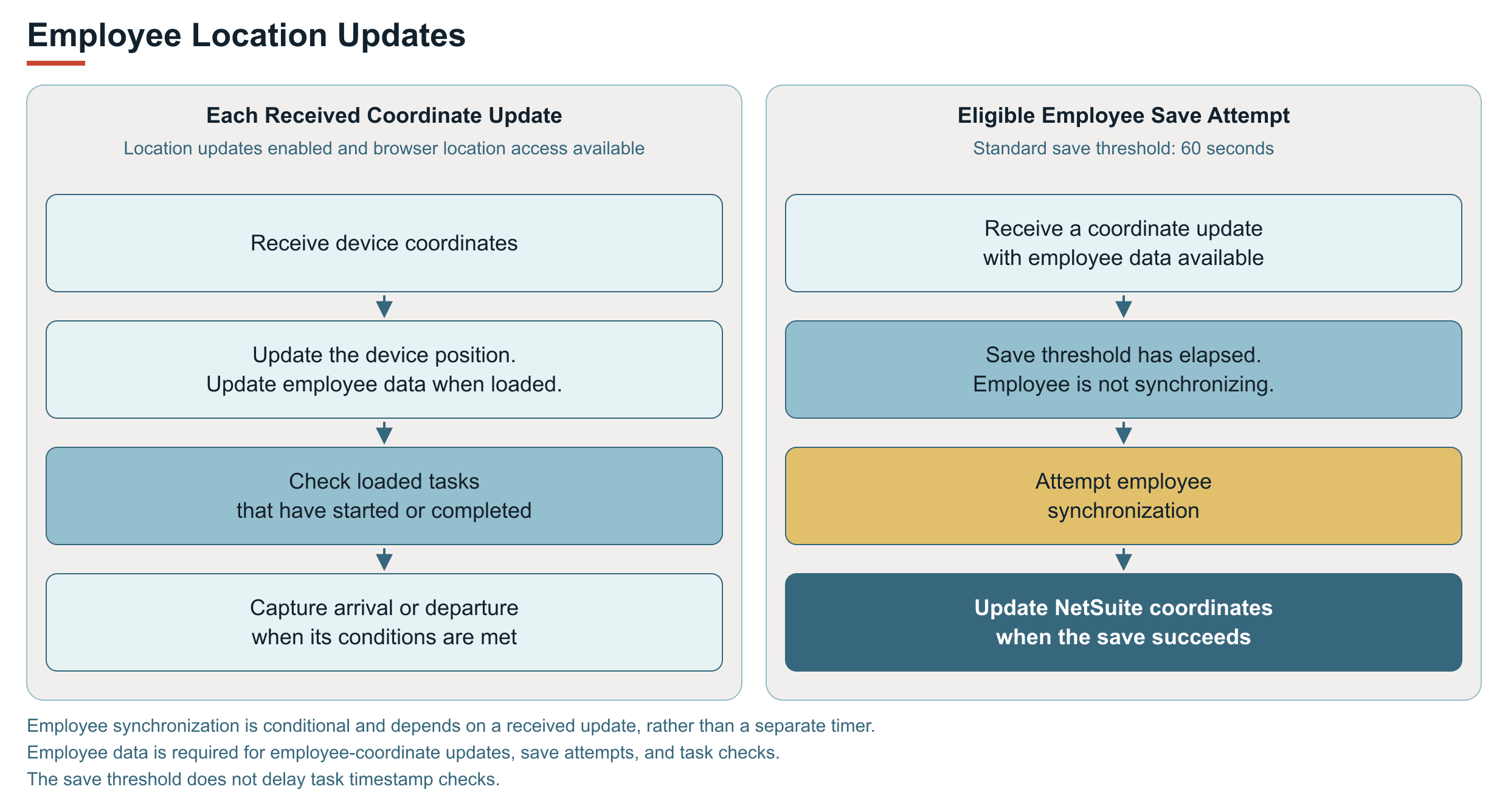
The standard save threshold is 60 seconds. A save attempt depends on a coordinate update arriving after that threshold and on the employee record not already being synchronized. The threshold does not guarantee a location update or a successful save every 60 seconds.
When an administrator opens FSM Mobile to view another employee through the proxy view, device location watching is disabled for that view.
Arrival and Departure Timestamps
Each received device coordinate update also checks task and project task data loaded in FSM Mobile for tasks that have started or completed. The check compares the received device latitude and longitude with the task's Field Service Latitude and Field Service Longitude. The configured on-site distance determines whether the employee is within proximity of the task.
Arrival capture requires a started or completed task with no arrival timestamp and an on-site position. Departure capture requires completion, an arrival timestamp, no departure timestamp, and off-site classification. Captured timestamps reach NetSuite only after successful synchronization. The following diagram compares arrival and departure capture:
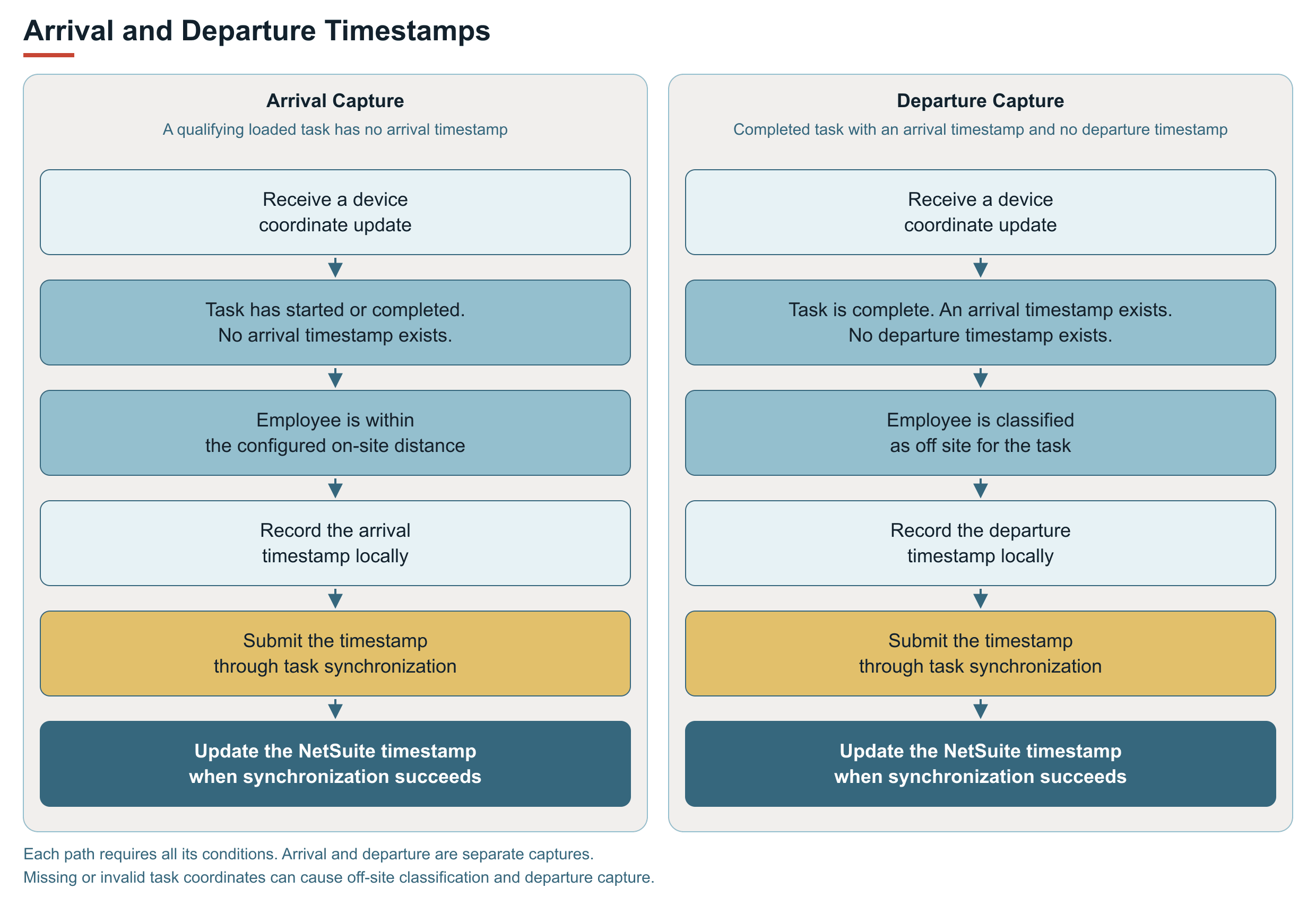
FSM Mobile captures timestamps under the following conditions:
-
If an eligible task has no arrival timestamp and the employee is within the on-site distance, FSM Mobile records an arrival timestamp.
-
For completed tasks with an arrival timestamp and no departure timestamp, FSM Mobile records a departure timestamp when the employee is classified as off site.
These checks run when device coordinates are received. The 60-second employee-coordinate save threshold does not delay the timestamp checks. Each captured timestamp is saved locally and submitted through the task's synchronization path. Local capture alone does not confirm a successful update in NetSuite.
For the relationship with task start, completion, and service-time processing, see FSM Service Time Tracking. FSM Mobile Data Sync and Refresh explains the synchronization boundary.
If task coordinates are missing or invalid, FSM Mobile treats the task as off site during location checks. For a completed task with an arrival timestamp and no departure timestamp, this can trigger departure capture. A departure timestamp alone is therefore not independent confirmation that the employee physically crossed the proximity boundary.