FSM Maps and Location Tracking
Field Service Management (FSM) displays task, project task, and employee positions on maps in FSM Mobile and the Schedule Board. The task's Field Service Latitude and Field Service Longitude identify where the work takes place. The employee's latitude and longitude identify the employee's available position.
FSM can calculate task coordinates from the task's Field Service Address. Device location updates supply coordinates for the signed-in employee. FSM can also capture task arrival and departure timestamps by comparing the employee's position with the task's position.
In FSM Mobile, a selected task can also display a route, distance, and travel time. An external map link opens the task destination in a map service outside FSM Mobile.
How It Works
Task and project task records supply the destination coordinates. Employee data and received device updates supply employee positions. The flows in this topic separate how task fields are populated from how maps, navigation, and tracking use those fields.
Task maps and tracking use the task's separate latitude and longitude fields. FSM can calculate coordinates from an address or copy location values from a selected asset. See FSM Task Address and Coordinates for the field reference, lookup conditions, asset sourcing, and valid map positions.
Map Display
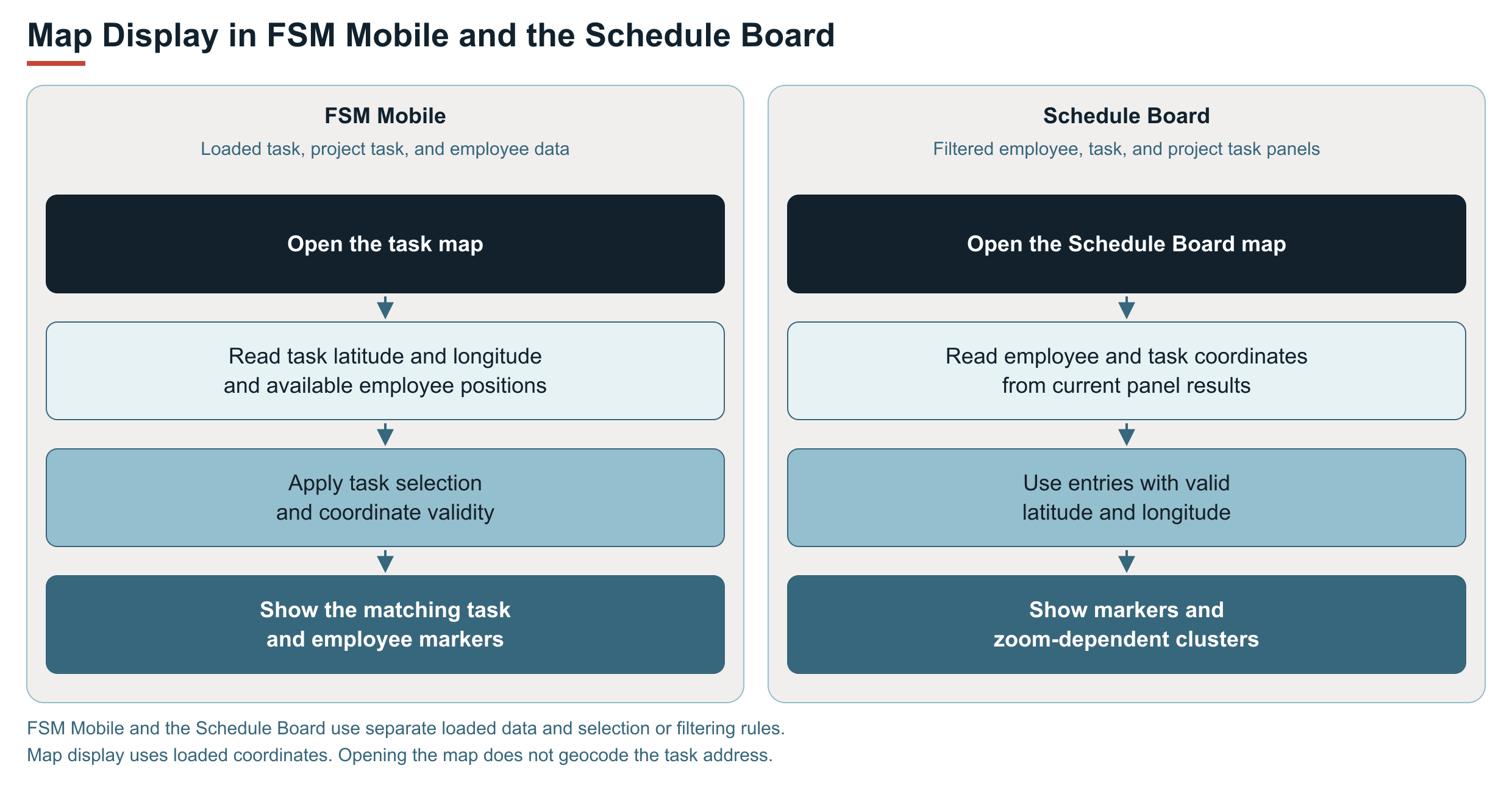
FSM Mobile and the Schedule Board use their own loaded data and selection or filtering rules to determine which locations appear.
FSM Mobile uses loaded tasks and task selection. The Schedule Board uses current filtered panels. Both require valid coordinates for displayed markers. The following diagram compares the map display flows:
FSM Mobile
The task map displays available employee positions and positions for task and project task records loaded in FSM Mobile. Selecting a task limits task markers to that task. Resources associated with the selected task can also appear when the resource data includes valid coordinates.
Schedule Board
With the standard panel mappings, the Schedule Board map displays employees from the resource panel. It displays task and project task records from the assigned and unassigned work panels. Panel filtering affects which employees and tasks appear on the map. Only entries with valid coordinates appear as markers.
Nearby employee markers and task markers can be grouped into clusters when the zoom level changes. A cluster displays the number of entries in that group. The Fit All control adjusts the map to include the displayed markers and clusters.
Task Navigation
FSM Mobile provides an in-app route and an external map link. Each uses different destination information and provides different results.
The in-app route uses employee and task coordinates and displays returned directions. By default, the external link opens the task address in another map service. The following diagram compares these navigation functions:
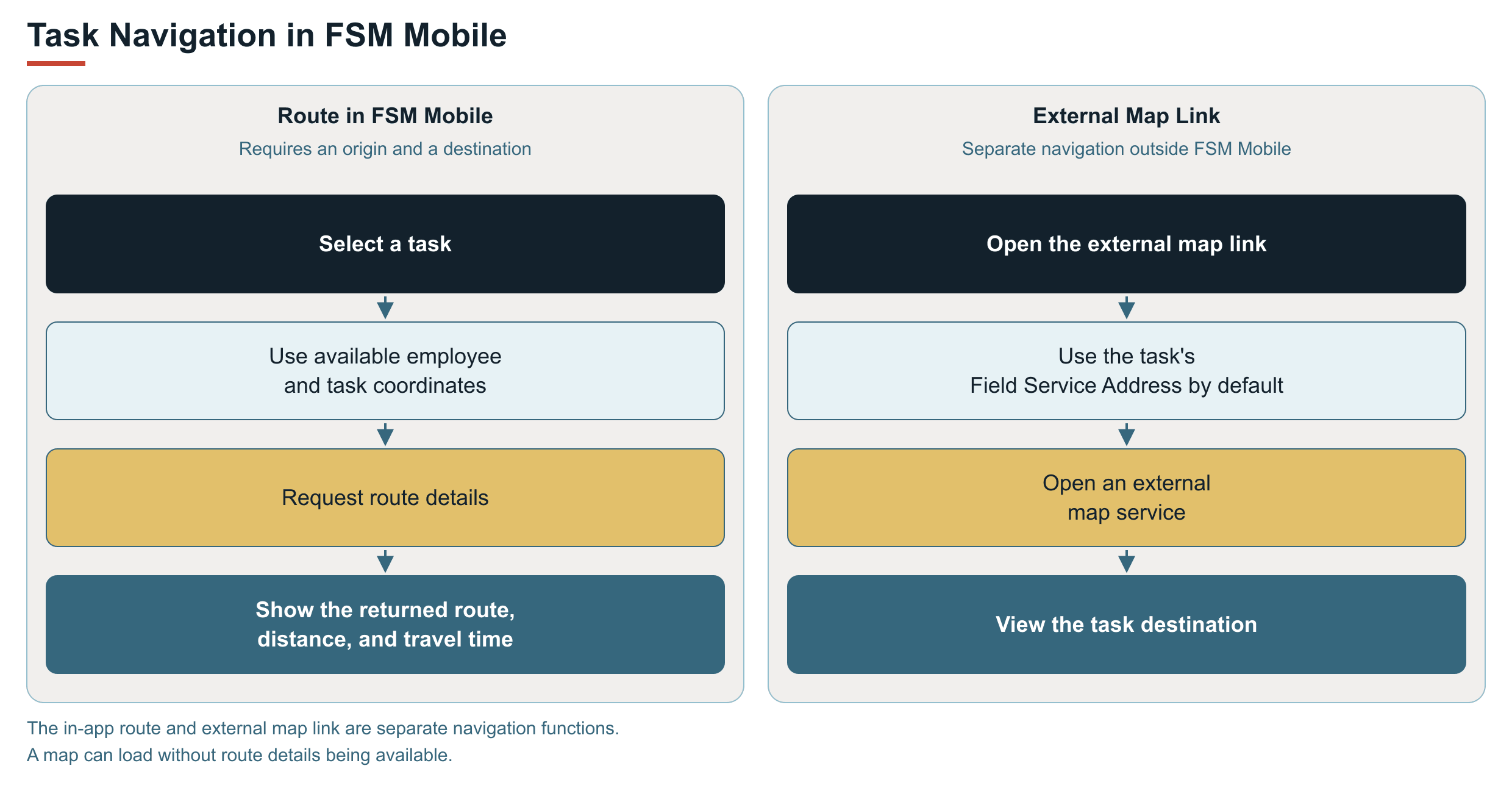
The selected task map requests directions from the employee's available coordinates to the task's coordinates. When route details are returned, FSM Mobile displays the route, distance, and travel time. Both an origin and a destination are required for this request.
The external map link uses the task's Field Service Address by default. The link and the route displayed inside FSM Mobile are separate navigation functions.
With location updates enabled, browser location access, and employee data available, received device coordinates update employee positions and check eligible tasks for timestamps. Task timestamp checks run on each received update and do not wait for the standard 60-second threshold between employee-coordinate save attempts. See FSM Mobile Location Updates and Task Timestamps for capture conditions and synchronization boundaries.
Scheduled maintenance assesses cached address lookups before selecting records for coordinate migration. Migration combines existing nonzero latitude and longitude into Geolocation without an address lookup. See FSM Stored Coordinate Maintenance for selection conditions and verification.
Record Interactions
The following records supply location data or receive location updates.
|
Record Type |
Feature Role |
|---|---|
|
Task and project task |
Their Field Service Latitude and Field Service Longitude supply task marker positions, route destinations, and on-site comparison positions. Their FSM Mobile resources also receive captured arrival and departure timestamps through synchronization. |
|
Employee |
Supplies employee positions for the maps. FSM Mobile saves received device coordinates to the signed-in employee's Field Service Latitude and Field Service Longitude. |
|
Field service asset, when selected on a task or project task |
Supplies an address and coordinates that can be copied onto the task. The task marker and tracking checks use the resulting task fields. |
Configuration
Administrators can configure automatic address lookup, FSM Mobile location tracking, map display, and the distance used for on-site checks. For settings and defaults, see Configuring FSM Maps and Location Tracking.
Limitations and Constraints
The following limitations apply:
-
A displayed employee position is based on the coordinates available to FSM. The marker alone does not establish when the device last supplied coordinates or when NetSuite last received a successful update.
-
Browser location access and received device coordinates are required for device location updates. A stored employee position can still be available when no updated device position has been received.
-
If task coordinates are missing or invalid, FSM Mobile treats the task as off site during location checks. For a completed task with an arrival timestamp and no departure timestamp, this can trigger departure capture. A departure timestamp alone is therefore not independent confirmation that the employee physically crossed the proximity boundary.
-
Missing or invalid coordinates prevent a corresponding map marker from being displayed. In-app route requests also require both employee and task positions.
-
FSM Mobile distinguishes a map load failure from a route details failure. A map can load without route details being available.