4 Manage Receivables/Payables
This topic provides systematic instructions to corporate user to manage all receivables/payables associated with the corporate party.
The portal provides a single screen to the corporate party, for all possible actions that can be taken on receivables/payables. At present, the following actions can be effected on relevant receivables/payables.
- Accept
- Accept/Reject Discount Offer
- Edit
- Cancel
- Raise Dispute
- Resolve Dispute
- Assignment
Note:
These actions are not available on a mobile device at present.- From the Dashboard, click the Toggle Menu, then click Receivables/Payables, Receivables/Payables Management, and Manage Receivables/Payables.
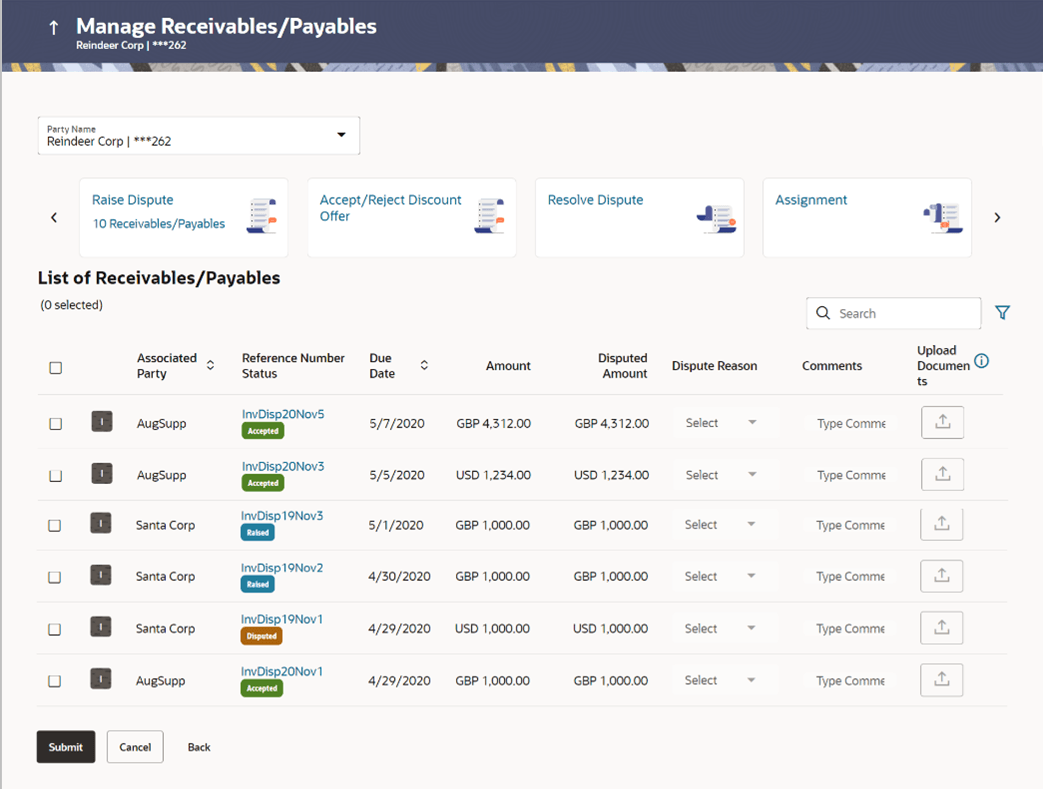
Table 4-1 Manage Receivables/Payables - Field Description
| Field Name | Description |
|---|---|
| Party Name | Select the party name from the dropdown list to view
the applicable list of receivables/payables. By default, the primary
party/gcif of the logged-in user is selected.
Note: Only accessible parties are displayed to the user. Based on the party selection, the list of receivables/payables is displayed. |
| Action Tiles | Select the required action to be effected on the
relevant receivables/payables.
On selecting an action tile, the number of receivables/payables that can be effected by that action, appears in the respective tile. The List of Receivables/Payables section is also updated with the relevant receivables/payables records. The options available are:
|
This topic contains following sub-topics:
- Accept/Reject
This topic provides systematic instructions to accept receivables/payables to convey the agreement to pay the receivable/payable amount. - Accept/Reject Discount Offer
This topic provides systematic instructions for the supplier to either accept or reject discount offers that have been linked to invoices. - Edit
This topic provides systematic instructions to modify the receivable/payable. - Cancel
This topic provides systematic instructions to the supplier tocancel a receivable/payable. - Raise Dispute
This topic provides systematic instructions to raise a dispute against the receivable/payable. - Resolve Dispute
This topic provides systematic instructions to resolve disputes that have been raised against receivables/payables. - Assignment
This topic provides systematic instructions to a corporate party to assign the responsibility of handling their receivables/payables to a factor. - Search (overlay window for Manage Receivables/Payables)
This topic provides systematic instructions to search for receivables/payables based on the filter criteria.