Resizing a VM Instance
The size of a VM is indicated by the flavor on whose basis the VM is launched. See How to Create a VM Instance for the steps to create a VM instance. The following figure shows details about a sample VM hr_vm1 as displayed on the Horizon dashboard.
Figure 6 VM Instance Size
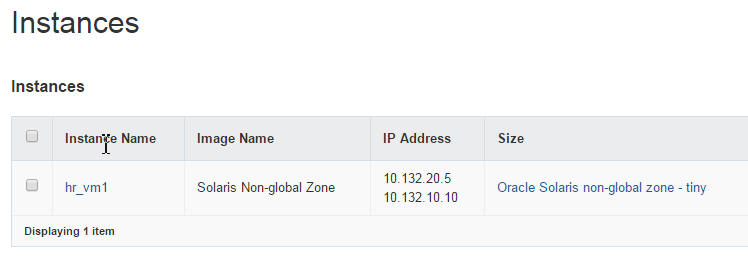
The figure shows that the size of hr_vm1 is the size that has been defined for the Oracle Solaris non-global zone - tiny flavor. By clicking on the instance name, you can see details about the specific flavor:
-
RAM = 2 GB
-
VCPUs = 1 VCPU
-
Disk = 10 GB
Resizing an instance means using a different flavor for the instance.
By default, the resizing process creates the newly sized instance on a new node. However, if you are resizing to a non-global zone flavor, you must set the resize process to complete in the same node. Non-global zones require to be of the same version as their original global zone. Resizing to a non-global zone flavor and have the instance created in a different node risks putting the instance in a node that has a different global zone version. To prevent the risk and create the resized instance on the same host, set allow_resize_to_same_host to true in the /etc/nova/nova.conf file.
However, kernel zones do not have this limitation of non-global zones. Thus, you can resize a kernel zone to another node.
How to Resize a VM Instance
Before You Begin
Know the current size of the VM instance that you want to modify. You can obtain this information from the dashboard. For an example, see Figure 6.
-
Set the global shell variables.
# export OS_USERNAME=nova
# export OS_PASSWORD=service-password
# export OS_TENANT_NAME=service
# export OS_AUTH_URL=http://$CONTROLLER_ADMIN_NODE:5000/v2.0"
-
If you are resizing to a non-global zone flavor, edit the following parameter in the /etc/nova/nova.conf file as follows:
allow_resize_to_same_host=true
-
Display the list of flavors.
# nova flavor-list
- Note the ID number for the new flavor which you want the VM instance to use.
-
Change the VM instance to use the new flavor by referencing the flavor's ID number.
# nova resize instance-name flavor-id
For example, suppose that currently, the size of the instance hr_vm1 is set to the Oracle Solaris non-global zone - tiny flavor, whose ID number is 6. You want to resize the instance to the Oracle Solaris non-global zone - medium flavor, whose ID number is 8. You would type the following:
# nova resize --poll hr_vm1 8
The –poll option enables you to see the progress of the resizing process until its completion.
- (Optional)
Verify on the dashboard that the size of the instance has changed to the new flavor.
Alternatively, you can make the same verification by using the following command:
# nova show instance-name
Check that the value for the flavor field specifies the new flavor in the previous step.
The following example is an extracted output. The instance hr_vm1 is created in a project called TenantA and has been resized to Oracle Solaris non-global zone - medium.
# export OS_USERNAME=admin
# export OS_PASSWORD=admin-password
# export OS_TENANT_NAME=TenantA
# export OS_AUTH_URL=http://$CONTROLLER_ADMIN_NODE:5000/v2.0"

# nova show hr_vm1
+----------------+-----------------------------------------------+
| Property       | Value                                         |
+----------------+-----------------------------------------------+
| ...                                                            |
| created        | 2016-01-26T12:38:47Z                          |
| flavor         | Oracle Solaris non-global zone - medium (8)   |
| ...                                                            |
+----------------+-----------------------------------------------+