Oracle Cost Advisor for AI
Gain insights into AI spending, plan budgets and forecasts, and identify optimization opportunities with Oracle Cost Advisor for AI in OCI Generative AI.
Pre-General Availability: 2026-10-27
The following legal notice applies to Oracle pre-GA releases. For copyright and other applicable notices, see Oracle Legal Notices.
Pre-General Availability Draft Documentation Notice
This documentation is in pre-General Availability status and is intended for demonstration and preliminary use only. It may not be specific to the hardware on which you are using the software. Oracle Corporation and its affiliates are not responsible for and expressly disclaim all warranties of any kind with respect to this documentation and will not be responsible for any loss, costs, or damages incurred due to the use of this documentation.
This documentation is not a commitment by Oracle to deliver any material, code, functionality or services. This documentation, and Oracle Pre-GA programs and services are subject to change at any time without notice and, accordingly, should not be relied upon in making purchasing decisions. The development, release, and timing of any features or functionality for Oracle’s Pre-GA programs and services remains at the sole discretion of Oracle. All release dates or other predictions of future events are subject to change. The future availability of any future Oracle program or service should not be relied on in entering into any license or service agreement with Oracle.
Bring your organization's AI spending into focus and turn insights into smarter spending decisions with Oracle Cost Advisor for AI. See costs from all your connected AI providers in one dashboard, giving finance, technology, and engineering teams a unified view to guide their decisions.
Cost Advisor supports OCI Generative AI, OpenAI, and Anthropic. With Cost Advisor, you can:
- Compare AI spending: Review usage and cost trends across providers and models to understand where your AI investment goes.
- Understand cost ownership: See how spending is distributed across teams, departments, and cost centers.
- Evaluate savings opportunities: Review Cost Advisor's recommendations for lower-cost models that could deliver similar quality, along with estimated savings.
- Plan your next investment: Compare actual spending with budgets, forecast future costs, and create reports to guide decisions about where to invest and where to optimize.
How Cost Advisor Works
The following diagram shows what you set up in the OCI Console, how Cost Advisor processes the data, and what you review and plan in Oracle Fusion Cloud Enterprise Performance Management (Fusion EPM).
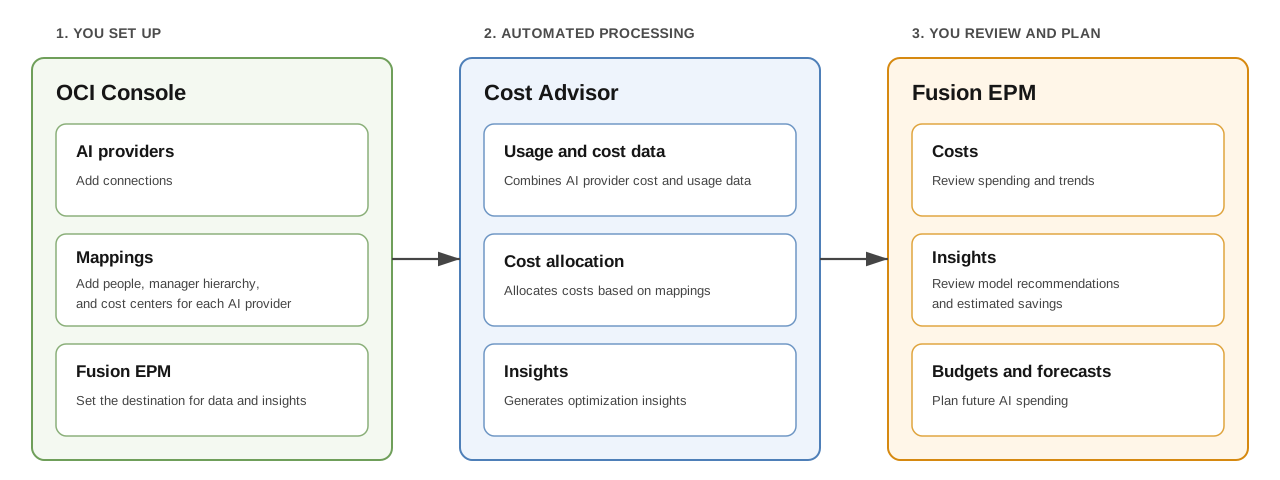
Connect your AI providers and add mappings that link usage to people, managers, and cost centers. This brings spending across providers and organizational owners into view, so you can compare costs and evaluate model recommendations and estimated savings together in Fusion EPM.
The process follows three steps, from connecting your data to reviewing results in Fusion EPM:
- Set up in the OCI Console: Add AI provider connections and mappings, and connect Fusion EPM to receive the data and insights.
- Cost Advisor processes the data: The service combines usage and cost data across connected providers and allocates costs based on your mappings. When insights are enabled, it uses intent classification to generate model recommendations and estimated savings. It delivers the resulting data and insights to Fusion EPM.
- Review and plan in Fusion EPM: After the data has been loaded into Fusion EPM, review actual costs and spending trends, evaluate model recommendations and estimated savings, and plan budgets and forecasts. See Reviewing AI Costs in Fusion EPM.
Workspaces
A workspace is the starting point for Cost Advisor. This regional resource brings together AI provider connections, person and project ID mappings for cost allocation, insights settings, and a destination for delivering data and insights. You can create separate workspaces for teams, business units, or environments, or to manage sets of provider data independently.
We recommend adding several AI providers and the optional person and project ID mappings. Connecting several providers gives you a broader view of your organization's AI spending. Mappings associate costs with the people and projects responsible for the usage, supporting more detailed cost allocation and reporting in Fusion EPM.
For details, see Workspaces in Cost Advisor for AI.
Region Availability
For supported regions, see Regions for Cost Advisor for AI.
AI Providers
AI providers supply the usage and cost data that Cost Advisor analyzes. Add only the providers that you want included in a workspace. Cost Advisor doesn't automatically collect data from every AI provider that your organization uses.
Supported AI providers:
- Oracle: OCI Generative AI.
- OpenAI: OpenAI Platform and ChatGPT Enterprise.
- Anthropic: Claude Platform and Claude Enterprise.
Learn about Adding AI Providers.
Integrations
Integrations add information about relationships between people, managers, and cost centers to help you understand cost ownership and put AI spending insights in the context of your organization.
- Person mapping: Associate per-user AI costs with a person's management hierarchy and cost center, using their email address. Select one of two sources: an Oracle Fusion Cloud HCM connection or a CSV upload. Use CSV if you don't have Fusion HCM or prefer to upload person and organizational information manually.
- Project ID mapping: Associate costs from an OpenAI project, Anthropic workspace, or OCI tenancy with the responsible management hierarchy and cost center. Identify each resource by its OpenAI project ID, Anthropic workspace ID, or tenancy OCID. CSV upload is the only source for this mapping.
We recommend adding both mappings because they apply to different usage sources. Each supplies its own hierarchy, and both contribute to the organizational structure used for cost attribution in Fusion EPM. Use the separate template for each CSV upload. Learn about Adding Integrations.
Destination
Cost Advisor delivers data and insights to your configured Fusion EPM instance, where you can analyze AI spending, plan budgets and forecasts, and create reports.
Each workspace supports one destination. Work with your EPM and identity domain administrators to prepare the environment and connect it to the workspace.
Cost Advisor processes the previous UTC day's data daily at 09:00 UTC, beginning the day after onboarding. For delivery and reporting details, see Data Processing and EPM Reporting.
For setup instructions, see Adding a Destination and Preparing Fusion EPM for Cost Advisor for AI.
For reporting views, planning activities, and guidance on evaluating savings, see Reviewing AI Costs in Fusion EPM.
Get Started
Start with Preparing to Use Cost Advisor for AI to gather the required access and information. Follow the setup sequence and estimated times, from creating a workspace and preparing Fusion EPM to connecting providers, mappings, and the destination.
To find or open an existing workspace, see Listing Cost Advisor Workspaces and Getting a Cost Advisor Workspace's Details.