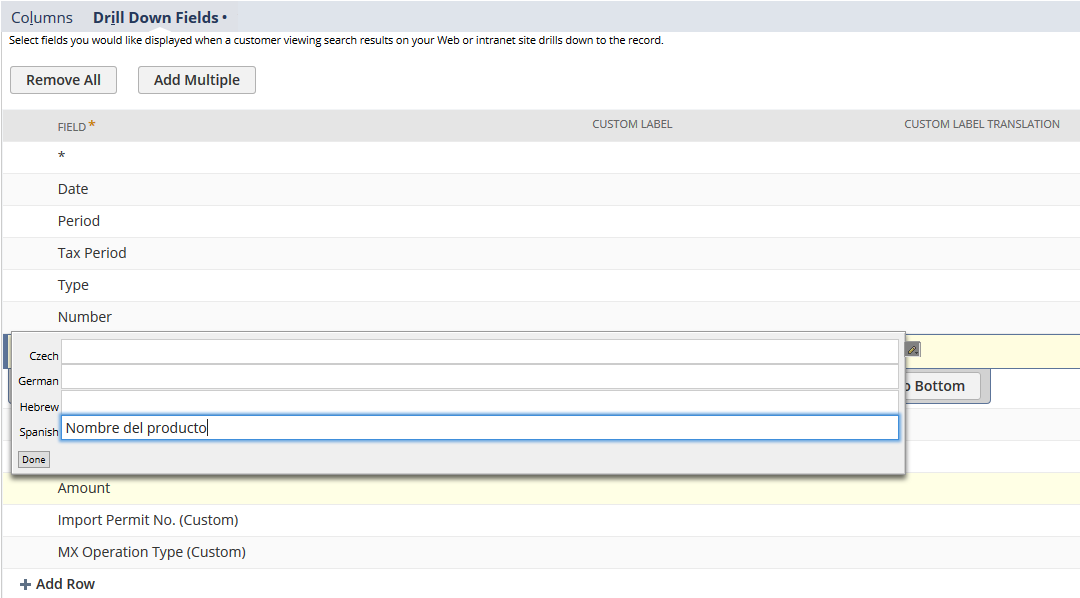
Adding Translations for Saved Search Column Headings
To add translations for saved search column headings:
-
From the Saved Search definition page, click the Results subtab.
-
Click the Field that you want to edit.
-
Click the Custom Label Translation column.
-
Enter the translated text for each language.
-
Click Done.
-
Click on the Summary Label Translation column.
-
Enter the translated text for each language.
-
Click Done.
-
Repeat steps 2-8 for every Field that requires translating.
-
Click Save.
Note:
If the Multi-Language feature is enabled, the Results subtab of the Saved Search definition page will display two additional columns - Custom Label Translation and Summary Label Translation.