E6-2L Back Panel Connectors and Ports
The following figure shows the locations of cable connectors and ports on the back of Oracle Communications Server E6-2L and the cables and devices that you connect to them.
Figure 6-1 E6-2L Back Panel Connectors and Ports
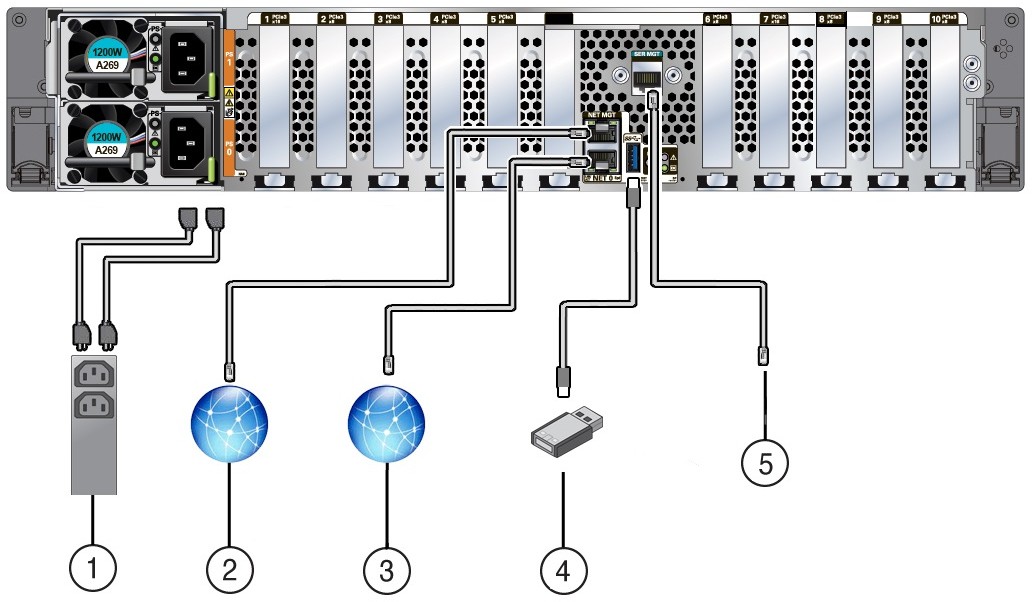
Figure 6-2 E6-2L Back Panel Connectors and Ports
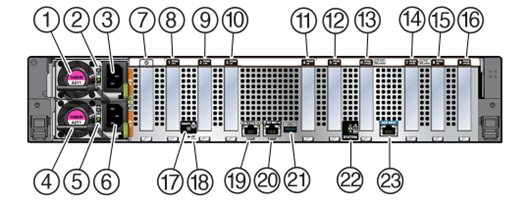
| Call Out | Cable Port or Expansion Slot | Description |
|---|---|---|
| 3 and 6 | Power supply 0 input power
Power supply 1 input power |
The server has two power supply connectors, one for each power supply. Power supply 0 input power and Power supply 1 input power both connect to a rack power distribution unit (PDU).
Do not attach power cables to the power supplies until you finish connecting the data cables to the server. The server goes into Standby power mode, and the Oracle ILOM service processor initializes when the AC power cables are connected to the power source. System messages might be lost after 60 seconds if the server is not connected to a terminal, PC, or workstation. Oracle ILOM signals a fault on any installed power supply that is not connected to an AC power source, which might indicate a loss of redundancy. |
| 20 | Network management port (NET MGT) | The service processor NET MGT port is the optional connection to the Oracle ILOM service processor. The service processor NET MGT port uses an RJ-45 cable for a 100/1000BASE-T connection. See NET MGT Port.
The NET MGT port is configured by default to use Dynamic Host Configuration Protocol (DHCP). To set a static IP address, see Modifying Network Settings. |
| 19 | Ethernet port (NET 0) | The host management Ethernet port enables you to connect the system to the network. The Ethernet port uses an RJ-45 cable for a 1 Gbps Host Management connection. See Host Management Ethernet Port. |
| 21 | USB port | The USB port supports hot-plug insertion and removal. You can connect and disconnect a USB cable or a peripheral device while the server is running without affecting server operations. See USB Port. |
| 23 | Serial management port (SER MGT) | The service processor SER MGT port uses an RJ-45 cable and terminal (or emulator) to provide access to the Oracle ILOM command-line interface (CLI). Using Oracle ILOM, you can configure it to connect to the system console. See SER MGT Ports.
This port does not support network connections. |