Energy Use Benchmark
The Energy Use Benchmark module provides a dynamic and personalized, at-a-glance interpretation of the customer's energy use. Energy use is categorized into one of the three sections or statuses: Fair, Good, and Great. The customer's status is determined by their performance relative to their Three-Bar Neighbor Comparison or Efficiency Zone modules.
Appears in: Progress Report, Limited Income Report,Time of Use Report, Solar Report
Requirements
Utility Requirements
| Category | Description |
|---|---|
| Required Cloud Service | Energy Efficiency Cloud Service |
| Scale | Not applicable. |
Customer Requirements
| Category | Description |
|---|---|
| Billing Frequency | Monthly, bi-monthly, or quarterly. |
| Data Delivery Frequency | Not applicable. |
| Data Requirements | Not applicable. |
| Data History |
A minimum of one historical bill. |
| Data Coverage |
Not applicable. |
| Supported Fuels | Progress Report, Limited Income Report, Time of Use Report: Electric-only, gas-only, and dual fuel. Solar Report: Electric-only and gas-only. </entry> |
User Experience
Energy Use Benchmark
This section describes the user experience of the Energy Use Benchmark design for the Peak Focused Report, Limited Income Report, and Time of Use Report
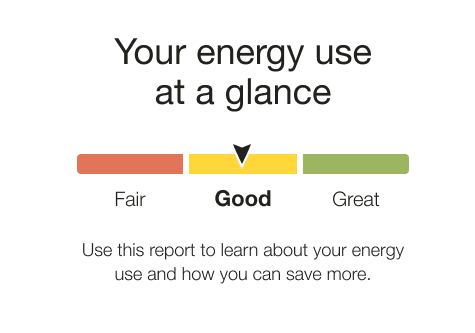
Heading: The heading notifies the customer that the energy use benchmark gives them an at-a-glance view of their energy use. It varies according to the customer's fuel type.
Energy Use Benchmark: The benchmark gauge is broken into three sections: Fair, Good, and Great. A customer's status on that gauge is determined by their performance relative to both comparison points in the Normative Comparisons. A customer's performance is indicated with an arrow that sits in the middle of a given segment of the gauge. Each state has a corresponding color:
- Orange: Fair. Customer is using more than Similar Homes.
- Yellow: Good. Customer is using more than Efficient Neighbors / Efficiency Zone threshold, but less than Similar Homes.
- Green: Great. Customer is using less than the Efficient Neighbors / Efficiency Zone threshold.
Benchmark Copy: Depending on the customer's current state and any differences since their last report, the copy below the gauge tells the customer how they can leverage the report or recognizes a change in state. In some instances, the benchmark copy reemphasizes the customer's fuel type.
Solar Energy Use Benchmark
This section describes the user experience of the Solar Energy Use Benchmark which accommodates negative energy states experienced by solar customers in the Solar Report.
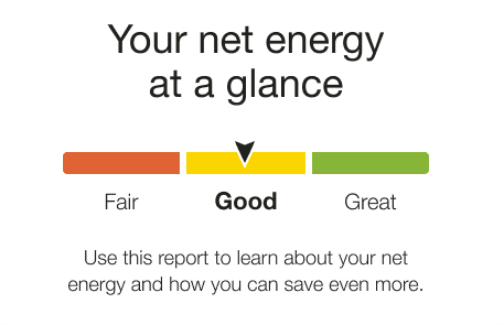
Heading: The heading notifies the customer that the energy use benchmark gives them an at-a-glance view of their net energy use.
Energy Use Benchmark: The benchmark gauge is broken into three sections: Fair, Good, and Great. A customer's status on that gauge is determined by their performance relative to both comparison points in the Three-Bar Neighbor Comparison. A customer's performance is indicated with an arrow that sits in the middle of a given segment of the gauge. Each state has a corresponding color:
- Orange: Fair. The customer's net energy was positive and more than similar homes.
- Yellow: Good. The customer's energy use falls into one of the following categories:
-
Net energy was positive and less than similar homes
-
Net energy was negative and more than similar homes
-
Net energy was negative and more than efficient homes, but less than similar homes
-
- Green: Great. The customer's net energy was positive or negative and an efficient home.
- Yellow: State Change (High to Low)..The customer's benchmark state has changed from Fair to Good or Good to Great since the last report.
Benchmark Copy: The copy below the gauge tells the customer how they can leverage the report or recognizes the customer's lower net energy use.
User Experience Variations
The user experience varies for customers depending upon their service types, available data, costs, and locale. Note that the following list indicates the primary user experience variations, not all possible variations.
Progress Report, Limited Income Report, and Time of Use Report
Benchmark State: The copy below the gauge changes depending on the customer's current state and any differences since their last report. Possible states include:
- Fair state: Explains how to use the report.
- Good state: Explains how to use the report.
- Great state: Congratulates the customer for being efficient.
- High to lower use state: Congratulates the customer for lowering their use compared to neighbors.
Low to higher use state: Helps the customer consider what may have changed.
Fuel Type: The customer's fuel type is displayed in the header and benchmark copy, "Your <fuel variation> use at a glance."
- Gas-only: The benchmark header and copy use the term 'gas.'
- Electric-only: The benchmark header uses the term 'electricity' and the benchmark copy uses the term 'energy.'
- Dual fuel: The benchmark header and copy use the term 'energy.'