16 Working with Generative AI in Reports
Generative AI (Gen AI) can bring more intelligence to reporting and analysis to aid decision-making in finance.
Reports provides the ability to utilize Generative AI (GenAI) for:
-
Generating narrative summaries in a text box or text rows or columns.
-
Summarizing Notes either in a text box or as an end user action.
Gen AI in Reports is available in Narrative Reporting and in the Cloud EPM Platform (Generating narrative summaries only). The Large Language Model (LLM) used by Reports is the GPT OSS 120B model.
Generating Narrative Summaries
Generating Narrative Summaries can be used for the following three use cases:
- Describe exceptions: Describe the cell(s) where a condition is satisfied. For example, a grid cell that satisfies the variance threshold defined by the report designer as a condition.
- Describe the causality for exceptions: Examine one of the relevant cell
dimensions where the condition was satisfied and describe the top or bottom
contributors to it. You can also perform a causality analysis on a grid formula,
such as a growth rate or variance percent to return the contributing analytic
dimension members.
Optionally, you can specify either a secondary analytic dimension, or an additional member generation or level within the same dimension, to perform Zoom. This is referred to as CausalityWith2LevelAnalysis.
- Do a comparative analysis: Describe the comparison between two columns, you can either compare two Period dimension columns, two specified columns, formula and/or data columns.
Narrative summary generation within a report is implemented using the Conditional
Text framework, together with corresponding Machine Learning (ML) template files for
each use case. These ML templates provide examples and instructions used by GenAI to
generate the narrative text. A Criteria Definition is created to capture the
parameters for each of the three use cases. Lastly, conditional text is defined at
the row, column, or cell level. When the condition is satisfied, the GenAI service
returns the narrative text using the ConditionalText
function.
For more information on the conditional text framework, see Working with Conditional Formatting, Text, and Suppression.
For more information on designing a report for generating narrative summaries, see Creating a Report with Generative AI for Narrative Summaries.
Summarizing Notes
Gen AI can be used to summarize Notes sourced from either a Note segment or a Note text box. Notes summarization is available either in a text box (designer setup) or as an end user action.
-
Text Box: using either the
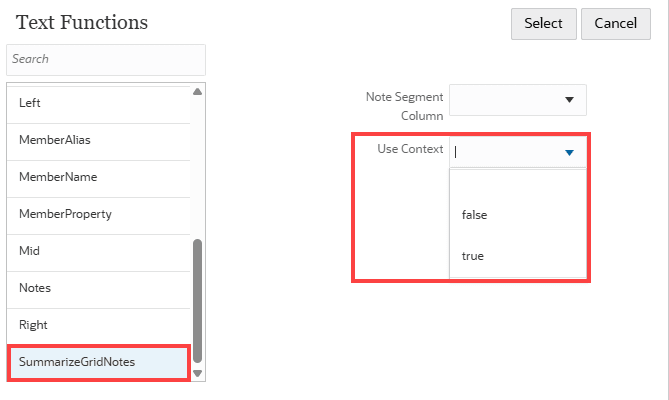
NotesorGridNotestext function (with an additional parameter) or theSummarizeGridNotestext function, the report designer can specify to have Notes summarized. -
End User Action: while previewing a report, you can select Summarize Notes from the Actions menu.
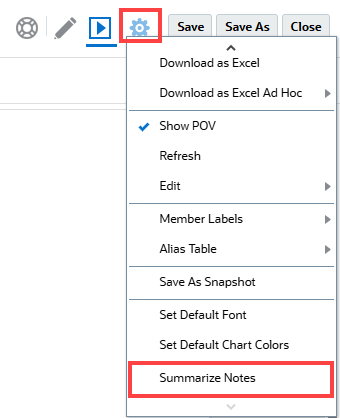
Shows pop-up with Summarize Notes dialog.

When using the SummarizeGridNotes function or the end user
Summarize Notes action, you can choose to Use
Context, which will include the data value for the member associated
with the Note segment. For example:
The main driver of higher other purchases and supplies expenses was additional contractor services, resulting in a 0.53% variance in Fees Outside Services. Finally, a minor decrease in facilities maintenance costs led to a 0.12% variance in Facilities Expenses.
For more information on designing a report for summarizing Notes, see Creating a Report with Generative AI for Narrative Summaries
Note:
-
The Reports GenAI feature is only currently available in Oracle Fusion Cloud Enterprise Performance Management Enterprise deployments for Narrative Reporting and the Cloud EPM business processes. It is not available in the Standard Cloud EPM licenses, nor legacy Enterprise Performance Reporting Cloud Service (EPRCS).
-
The availability of Oracle AI is not yet available in all OCI regions. To view the regions where it is available, refer to Availability of Generative AI in Operations Guide .
-
Narratives are generated only in English by default. However, you can translate the Gen AI text responses into other languages by updating the ML template files. For more information, see How to Customize the Machine Learning Property Files.
-
The Reports GenAI feature is a decision support tool. End users make any final decision regarding the interpretation of the information it provides. AI should be treated as a decision support tool only. Always review AI-generated content and verify its accuracy before using or relying on it.
 -- Introducing GenAI Capabilities in Narrative
Reporting
-- Introducing GenAI Capabilities in Narrative
Reporting
Learn about GenAI capabilities in Reports. Design Reports using
conditional text and the AutoTextSummary that automatically renders a
corresponding narrative using the Reports GenAI
feature.
Related Topics
- High-Level Architecture
- Enabling Generative AI in Narrative Reporting
- Creating a Report with Generative AI for Narrative Summaries
- Working with the Causality Criteria Type
- Creating a Report with Generative AI for Notes Summarization
- Working with the Generative AI Sample Reports
- Working with the Machine Learning Template Files
- Accessing and Managing the Machine Learning Property Files
- How to Customize the Machine Learning Property Files
- Generative AI Governors and Limitations