October Monthly Release
This topic lists the enhancements included in the October monthly release for NetSuite 2026.2.
This topic describes functionality available in NetSuite Next. NetSuite Next is being made available to customers in phases, so these features may not yet be available in your account. You'll receive in-app notifications when your account is eligible for NetSuite Next.
Ask Oracle
For this month's enhancements to Ask Oracle, see What's New in Ask Oracle.
Account Setup and Maintenance
The October monthly release for NetSuite 2026.2 includes the following enhancements to Account Setup and Maintenance features:
New Look to the NetSuite Login Page
The NetSuite login page has a new modernized look.
Artificial Intelligence (AI)
The October monthly release for NetSuite 2026.2 includes the following enhancements to Artificial Intelligence features:
Actionable AI Cards
The Ask Oracle chat panel and AI canvases can now present you with actionable cards. These cards provide relevant insights and actions, and they allow you to continue directly to a related Ask Oracle request without restating your question or context.
Cards can include supporting text, one or more actions, and optional images. Selecting an action automatically submits the related Ask Oracle request with the appropriate context.
In Ask Oracle chat and AI canvases, actions can either continue the current conversation or open a new Ask Oracle conversation.
Banking
The October monthly release for NetSuite 2026.2 includes the following enhancements to Banking features:
Bank Reconciliation UI Enhancements
The Bank Reconciliation Summary portlet now shows the count of automatically reconciled transactions in the last 30 days.
Improved Customer and Vendor Identification for Payment Application Suggestions
NetSuite has improved how the system identifies customers and vendors from imported bank transactions to generate payment application suggestions. The changes improve handling of punctuation and text containing both letters and numbers, as well as customer and vendor names within longer transaction memos.
For information about payment application suggestions, see these help topics:
Improved Matching with Enriched Bank Data
NetSuite has improved the algorithm for matching imported bank transactions based on enriched customer and vendor information. These improvements are expected to help the system better identify customers and vendors from imported bank transactions.
For information about bank data enrichment, see Enriched Bank Data for Transaction Matching.
Improved Management of Bank Connections Requiring Multifactor Authentication
When a bank connection can't authenticate because multifactor authentication (MFA) is required, NetSuite sends a notification email and stops automatic import attempts for that account. There won't be any more attempts when reauthentication is required, meaning you won't receive repeated import error notifications for that account.
A persistent banner on the Match Bank Data page lets you view accounts that require MFA.
New Standardized Bank Import Error Codes
New standardized error codes and messages are now available for bank connection and import errors. If you develop a Financial Institution Connectivity Plug-in, review the codes in the following table and update your plug-in to return or set the appropriate code for the error scenarios it handles.
|
Error code |
Error message |
|---|---|
|
2000001400 |
Account data unavailable. Your connection provider couldn't retrieve account data. Wait for the next scheduled import. If the problem continues, contact NetSuite Support. (Error 2000001400) |
|
2000001500 |
Required account data unavailable. Your connection provider couldn't retrieve all required account information. Contact NetSuite Support. (Error 2000001500) |
|
2000001600 |
Connection provider access blocked. Your financial institution is preventing the connection provider from accessing your account. Contact NetSuite Support. (Error 2000001600) |
|
2000001700 |
Connection session ended. Restore access to your bank connection before importing transactions. If you're an administrator, renew the bank connection. Otherwise, contact your administrator. (Error 2000001700) |
|
2000001800 |
Financial institution temporarily unavailable. Wait for the next scheduled import or try again later. If the problem continues, contact NetSuite Support. (Error 2000001800) |
|
2000001900 |
Bank connection refresh temporarily unavailable. Wait until another refresh is allowed or the next scheduled import runs. If the problem continues, contact NetSuite Support. (Error 2000001900) |
|
2000002000 |
Bank connection refresh limit reached. Wait until another refresh is allowed or the next scheduled import runs. If the problem continues, contact NetSuite Support. (Error 2000002000) |
|
0000000400 |
Bank connection setup unavailable. NetSuite can't complete setup because a required credential isn't available. Try again later. If the problem continues, contact NetSuite Support. (Error 0000000400) |
|
0000000401 |
Bank connection registration failed. NetSuite couldn't verify or create the registration required to set up the bank connection. Try again later. If the problem continues, contact NetSuite Support. (Error 0000000401) |
Customer Relationship Management (CRM)
The October monthly release for NetSuite 2026.2 includes the following enhancements to Customer Relationship Management features:
New AI-Powered Similar Cases Feature Enhances Support Case Resolution
Support teams often encounter questions or problems that have already been solved in the past. Locating those earlier cases can be time-consuming and may lead to repeating work or providing inconsistent responses. The new Similar Cases feature helps support reps and managers to quickly find related, previously resolved cases, enabling them to provide faster, more accurate answers.
When you click Generate Insight on the case detail page and view the Similar Cases tab, it displays a table of up to five related cases. These cases are all resolved cases (with Closed status) that AI has identified as being similar to the current case. Each related case listed shows the following:
-
Case number as a clickable link
-
Similarity score
-
Case subject
-
Customer name
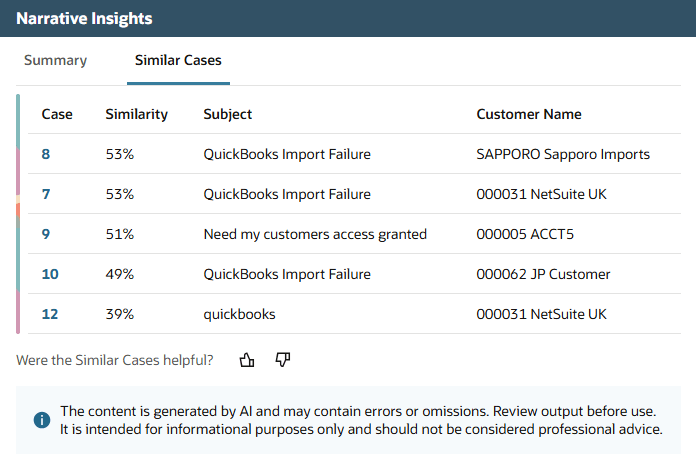
You can review the list of related cases and click any case number to view full details in a new browser tab. You can also provide feedback on the relevance of suggested cases.
The feature uses advanced AI models to analyze the case subject, metadata and the first case message. The models analyze the meaning and context of this data instead of only matching keywords. This approach helps find cases that are truly relevant even when the wording is slightly different.
Each time a case is closed, NetSuite automatically adds it to the index of eligible closed cases and makes it available for similarity comparison.
Note: Only cases closed after 7th October 2026 are included in the index.
The Support Case - View permission is required to use this feature.
For more information, see Similar Cases.
New AI MCP Permissions for Specialized User: CRM Roles
Administrators can now customize the Specialized User: CRM role to enable users with this role to use the NetSuite AI Connector Service to interact with NetSuite data using conversational AI. To be able to do this, the role must have the following permissions set to Full:
-
MCP Server Connection, permissions
-
Log in using OAuth 2.0 Access Tokens
-
REST Web Services
These permissions have a default level of None and administrators should grant them only when needed.
The Specialized User: CRM role continues to limit access to the records and actions allowed by its existing permissions.
For more information, see Specialized User: CRM, Get Started with the NetSuite AI Connector Service, and MCP Standard Tools SuiteApp.
Employee Management
The October monthly release for NetSuite 2026.2 includes the following enhancements to Employee Management features:
Configuration for CFO Insights: Labor Costs Report, Labor Costs and Revenue Insights Report
This release introduces new functionality for reports for Chief Financial Officers (CFOs). The Labor Costs Report and Labor Costs and Revenue Insights Report now include the ability to create several configurations that determine which payroll components will be included in the reports. After creating configurations, you can select which one you use when viewing these reports. You can also choose one configuration to be the default for each report.
For more information, see Labor Costs Report and Labor Costs and Revenue Report.
Inventory Management
The October monthly release for NetSuite 2026.2 includes the following enhancements to Inventory Management features:
Vendor Consigned Inventory for NetSuite WMS
If you use the Consigned Inventory Management feature, you can now use the NetSuite WMS app to process items enabled for consignment inventory. Through the NetSuite UI, you can also complete WMS tasks for these vendor consigned items.
Consigned Inventory Management does not yet support the following mobile processes:
-
Inbound Shipment Receiving
-
Inventory Transfers
-
Work Order Picking
-
Build Assembly
To preserve vendor ownership, you can assign only the standard Consigned - Good or your custom consigned inventory status to consigned quantities of an item. On the app, you can show or hide the Consigned column to tables for items, lot numbers, or serial numbers, among others.
If you process items enabled for bin use, you can combine consigned and non-consigned quantities of an item in a bin. Your item record settings still determine whether different items or lot numbers can be mixed in the same bin, regardless of ownership.
For requirements and setup procedures, see Consigned Inventory Management Setup. For more information about consigned inventory, see Consigned Inventory Management.
New Supply Chain Planning Engine Workbook
The new Supply Chain Planning Engine Workbook in SuiteAnalytics helps planners analyze supply and demand details and investigate planning messages.
The workbook includes two tables:
-
Planned Order Analysis - contains supply, pegged demand, and item-location planning parameters that explain planned-order quantities and dates.
-
Planning Engine Messages - shows planning messages and action details, including dates, quantities, and related planning orders and supply change orders.
The workbook displays results from the latest supply planning run for each supply plan definition. You can filter by supply plan definition, item, and location to focus your analysis.
To open the workbook, go to Analytics > Workbooks and select Supply Chain Planning Engine Workbook.
For more information, see Supply Chain Planning Engine Workbook.
Item Record Management
The October monthly release for NetSuite 2026.2 includes the following enhancements to Item Record management features:
Item Creation Assistant Enhancement
The Item Creation Assistant now supports batch editing for items. You can update multiple item candidates during the review process before submitting them for creation.
Additionally, validation warnings are displayed before item creation. These warnings help you identify and resolve potential issues earlier in the workflow, improving item data quality before the import is executed.
SuiteAnalytics
The October monthly release for NetSuite 2026.2 includes the following enhancements to SuiteAnalytics features:
Create Saved Searches with Ask Oracle
For users with access to NetSuite Next, Ask Oracle can create a saved search from natural language requests.
To do so, open Ask Oracle and describe the records you want to find. Alternatively, on the New Saved Search page, select Create saved search with Ask Oracle to open Ask Oracle in a separate browser tab. Ask Oracle drafts the search and a preview of the results, and lets you refine the draft before saving it. You can also review the full search definition or all results.
For more information, see [Create a Saved Search with Ask Oracle].
ODBC Driver Version 9.0.37.0 for Linux Available
As of October 19, 2026, ODBC driver version 9.0.37.0 for Linux is available for download. This version updates OpenSSL to version 3.5.7 and includes security fixes. Upgrade your ODBC driver to this version to get the latest updates.
To download the latest driver version, log in to NetSuite. In the Settings portlet on the Home page, click Set Up SuiteAnalytics Connect. For information about upgrading to the latest driver, see Downloading and Installing the ODBC Driver for Linux.
For information about the latest driver version, see ODBC Drivers.
SuiteBuilder (Customization)
The October monthly release for NetSuite 2026.2 includes the following enhancements to SuiteBuilder (Customization) features:
AI Description Validation for Custom Objects and Advanced Record Customization
NetSuite now validates new or nonempty AI descriptions for custom fields, custom record types, custom transaction types, and their overrides in Advanced Record Customization (ARC). AI features use an AI description only after it passes validation.
If an AI description does not meet validation requirements, update the description and save it again. If NetSuite cannot validate a description immediately, for example, if the validation service is temporarily unavailable, it validates the description automatically later. AI features do not use the description until there is a valid value.
For AI descriptions added through SuiteCloud Development Framework (SDF), bundles, or SuiteApps, NetSuite validates nonempty descriptions after installation or update. Validation does not block the installation or update.
For more information about AI Description, see AI Description for Custom Object Definitions.
AI Description for Custom Segment Applications
The AI Description for Segment Applications field is now available in the Details area of Custom Segment definitions. Use this field to explain why the segment exists and what business data it categorizes or classifies. NetSuite uses the same description for all segment field applications.
For more information, see AI Description for Custom Object Definitions.
AI Descriptions for Custom Records Backing Custom Segments
You can add an AI description to the custom record type that stores a custom segment's values. When you ask questions about those values, the description helps supported AI features understand what the values and related fields represent.
This enhancement uses the existing AI description validation and access control behavior for custom records. No additional role or permission is required.
For more information about AI description, see AI Description for Custom Object Definitions
SuiteScript
The October monthly release for NetSuite 2026.2 includes the following enhancements to SuiteScript features:
New Event Subscriber Script Type
The Event Subscriber script type lets you run follow-up processing asynchronously after supported record events, including record creation, update, and deletion. Because these scripts run after the originating record operation completes, their custom logic does not delay the operation.
To create an Event Subscriber script, define the handle(options) entry point in a SuiteScript 2.1 file and configure subscription criteria in an eventsubscriber SDF object. Each execution allows up to 1,000 usage units and can run for up to 300 seconds.
For more information, see SuiteScript 2.1 Event Subscriber Script Type, Script Type Usage Unit Limits, and Script Execution Time Limits.
Rank Documents by Relevance in the N/llm Module
You can now use the llm.reRank(options) and llm.reRank.promise(options) methods in the N/llm module to rank a list of document strings by their relevance to a prompt. The method returns document indexes and relevance scores in ranked order. Use each index to associate a result with its document in the original input array. The method doesn't return document text or generate an answer. By default, the method returns the single highest-ranked document. Set options.topN to return more results, up to the number of documents supplied.
A new enum, llm.ReRankModelFamily, is also available. This enum includes the rerank models that you can use with llm.reRank(options) and llm.reRank.promise(options). Currently, the cohere.rerank-v4.0-fast model is available to use.
For more information, see N/llm Module.
File Cabinet Access Controls for Custom Tools
Users with the Administrator role can now configure Allowed File Cabinet Access on the Custom Tools page. These account-wide settings grant View, Create, or Edit access to folders and their subfolders during custom tool execution. They apply to N/file operations across all custom tools, including tools used by the File Cabinet MCP Apps.
An empty list prevents custom tools from reading, creating, or updating files. Existing NetSuite role permissions still apply. The list doesn't restrict file operations through other SuiteScript modules or outside custom tool execution.
For more information, see Configuring File Cabinet Access for Custom Tools and File Cabinet MCP Apps.
SuiteTalk Web Services
The October monthly release for NetSuite 2026.2 includes the following enhancements to SuiteTalk Web Services features:
Source Request Link for Task Results Available in Asynchronous Batch Operations in REST Web Services
When you run an asynchronous batch operation in REST web services, each task result now contains a "rel": "request" link to the endpoint providing the request body, the method, and the URL in a serialized JSON object. This enables you to correlate the REST response not only by task ID, but also by the REST endpoint that was invoked.
For more information, see Batch Operations.