View and Change Deployment Details for a Project
To view or change the deployment details for a particular project:
- In Intelligent Advisor Hub, navigate to the Deployments Page.
- Click the deployment name. The deployment details page is displayed.
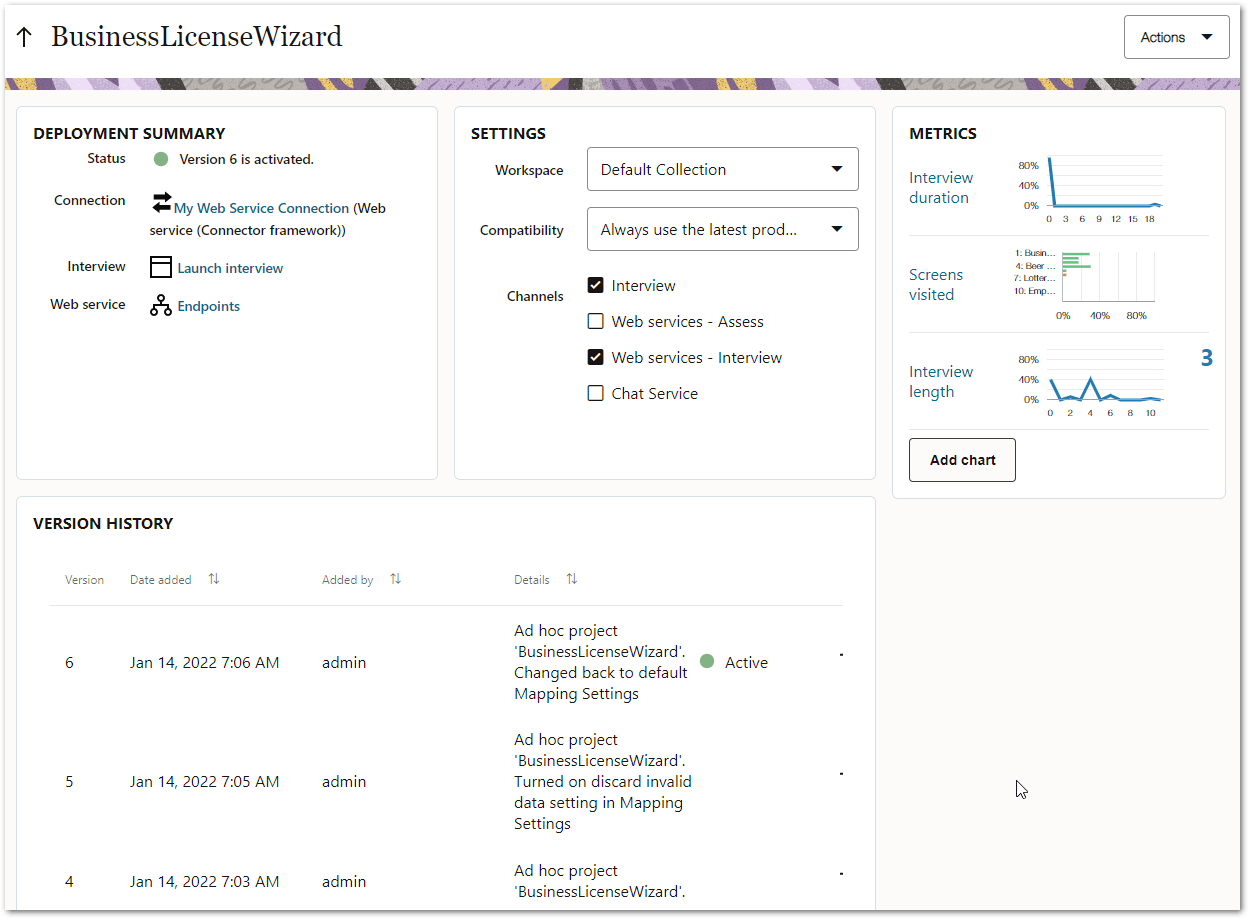
On this page Authors and Managers can:- see the namespace the project is in (if any) in the project header
- view the status of the deployment and which (if any) version is activated
- view the connection (if there is one) for the activated deployment, and click on the connection name to open that connection
- view which channels the deployment is activated on. If the deployment is activated on:
- the interview channel and it is a Policy Modeling project, they can start an interview with the currently activated version. For more information, see Test an Activated Interview.
- a web service channel, they can:
- for Policy Modeling projects, access a list of all available web services for the deployment. For more information, see Run a Web Service.
- for decision service projects, see how to invoke the decision service for the deployment. For more information, see Run a Project as a Decision Service.
- view the workspace that the deployment belongs to
- view the compatibility mode for the deployment
- view metrics showing usage information for the deployment. For more information, see View Deployment Statistics.
- view the version history for the deployment. For more information, see View the Deployment History for a Project.
- download a deployment version. For more information, see Download a Deployment Version.
- access the entire activation history. For more information, see View the Action Log for a Project.
- access a live view of a deployed decision service. For more information, see Test a Deployed Decision Service.
- see which projects and deployments are using a deployed decision service. For more information, see See Which Projects and Deployments Use a Decision Service.
In addition Managers can:
- change which channels the deployment is activated on. For more information, see Activate a Project.
- change the workspace that the deployment belongs to. Note that:
- the workspace cannot be changed for a deployment if its active deployment uses a connection and that connection does not allow access from the new workspace.
- if the workspace is changed for a deployed Policy Modeling project that uses a decision service, a warning will be displayed that the change will break the reference to the associated decision service.
- if the workspace is changed for a deployed decision service project, a warning will be displayed that the change will impact the associated deployments.
- change the compatibility mode for the deployment to allow more time to resolve upgrade issues. For more information, see Enable Compatibility Mode.
- activate the deployment or activate a different version of the deployment. For more information, see Activate a Project.
- choose the connection for the deployment (if the deployment is intended for use with Oracle Integration or another generic integration provider). For more information, see Choose an Oracle Integration Connection for a Deployment and Choose a Generic Provider Connection for a Deployment.
- delete a deployment version. For more information, see Delete a Deployment Version.
- deactivate the deployment. For more information, see Deactivate a Deployed Project.
- access the debug log for the deployment. For more information, see View the Debug Log for a Deployment.
- delete the deployment. For more information, see Delete a Deployment.