FSM Related Service Work
Field Service Management (FSM) creates and connects service work from an existing asset, case, project, or FSM Mobile task. These actions carry relevant relationships into the records being created so that each service visit remains connected to the work it supports. The capability also includes changes to those relationships and the consequences of deleting related work.
How It Works
A case brings together a service request and its customer relationship management (CRM) tasks. A CRM task represents a service visit. A project can provide the wider service context for a case. A subproject is another project beneath a parent project.
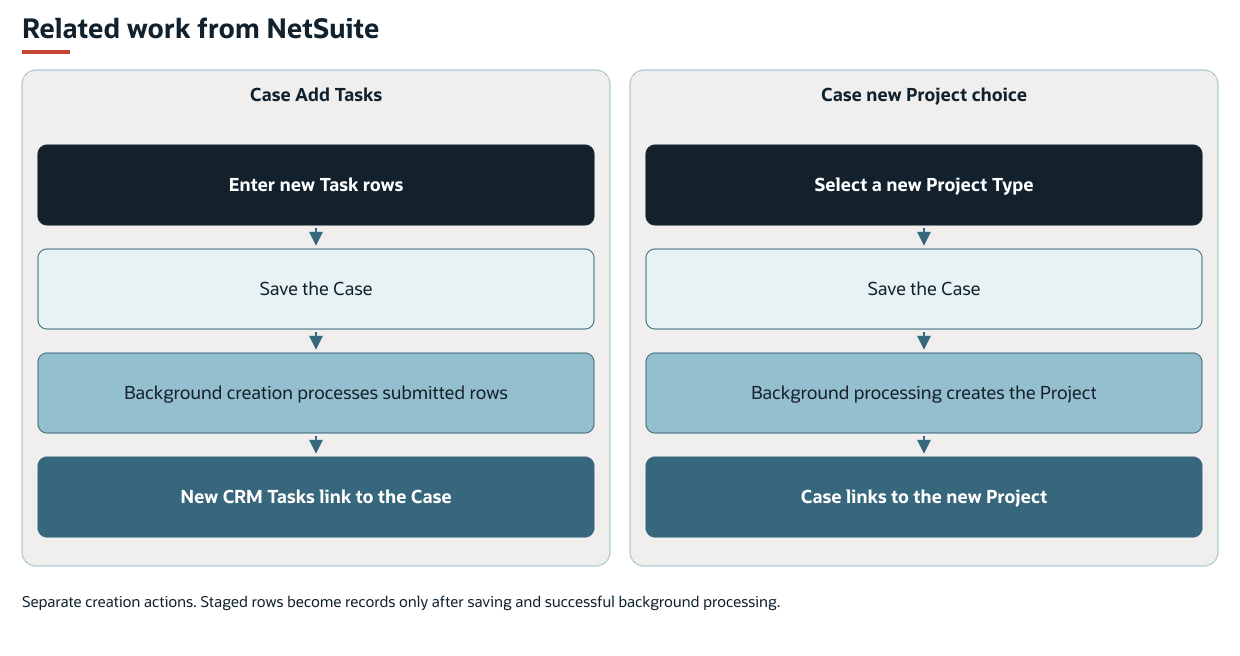
The following diagram shows separate NetSuite paths for adding tasks to a case and creating a project from a case:
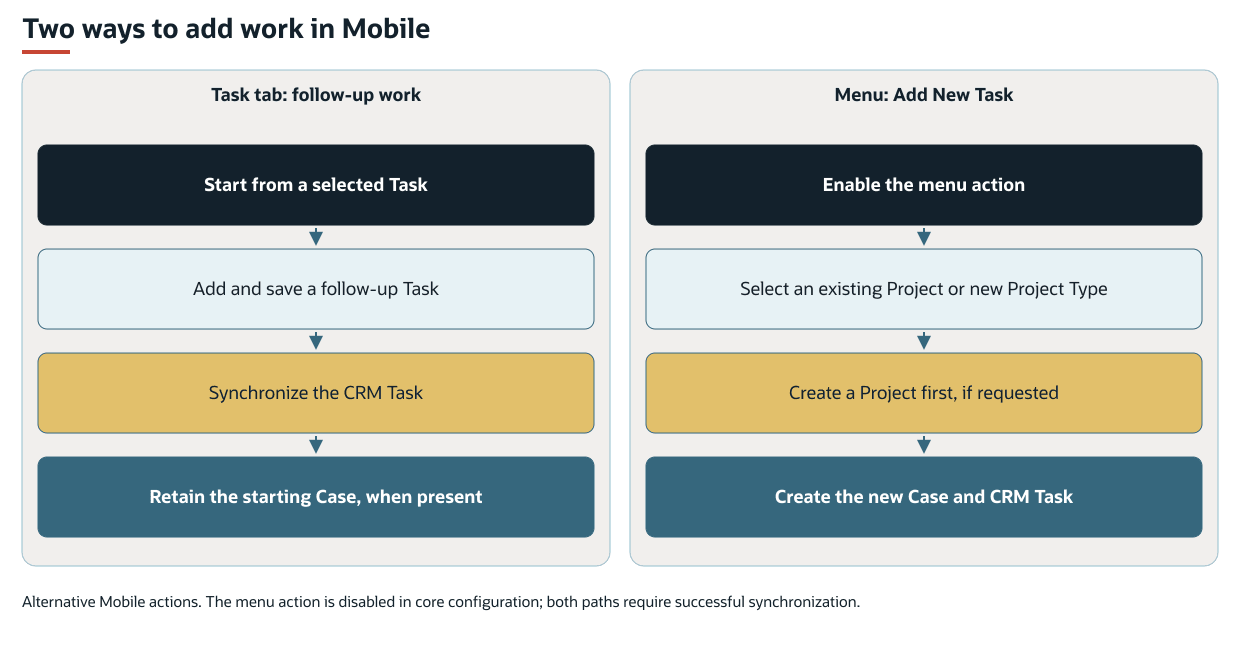
The following diagram compares follow-up task creation with Add New Task in FSM Mobile:
The starting record determines which relationships FSM supplies. Some actions open a form for you to complete. Other actions collect records on a list for creation after the starting record is saved.
The following table summarizes the starting records, actions, and results.
|
Starting Point |
Action or Trigger |
Result |
|---|---|---|
|
Asset in NetSuite |
New Project or New Task |
Opens a record creation form with the asset supplied. The record is created when you save the form. |
|
Case in NetSuite |
Add Tasks |
Stages CRM tasks for creation after the case is saved. |
|
Case in NetSuite |
Select an existing project |
Changes the case's Company relationship to that project when saved. |
|
Case in NetSuite |
Select a Project Type |
Creates a project in background processing and then links the case to it. |
|
Project in NetSuite |
Add Subprojects |
Stages child projects for creation after the parent project is saved. |
|
Selected task in FSM Mobile |
Task tab |
Creates additional CRM tasks from the selected work, with the same case when one is present. |
|
FSM Mobile menu, when enabled |
Add New Task |
Creates a case and CRM task, using an existing project or creating a project first. |
|
Asset creation |
Matching project-creation rule |
Creates projects associated with the asset through background processing. |
Creating related work does not by itself establish a recurring service schedule. FSM Program generates planned work from configured project and case rules. FSM Case and Task Recurrence maintains repeating case or CRM task series.
Prerequisites
The relevant FSM controls must be available on the NetSuite form or in the FSM Mobile configuration. You must have access to the required records and actions. The records must also contain the Customer, Asset, type, and scheduling information required by the chosen action.
For a timed task, the end time must be later than the start time. Dates and times depend on the service work's time zone. See FSM Service Time Zone Sourcing and Synchronization.
Key Behaviors
This section describes how the feature responds to different conditions and actions.
Adding Tasks to a Case
The Add Tasks list on a case collects entries for CRM task creation. It does not list the case's existing tasks.
The standard controls collect Task Type, date, and start and end times. Assignment, Message, Skills, and Confirmed Booking are optional. An unassigned row remains unassigned. This action does not assign an unassigned row to the person saving the case. Selecting Skills limits the available assignees to eligible employees who have every selected skill. This filter does not check scheduling conflicts or employee availability.
The initial date comes from the case's start date. The date-range action adds one task for each calendar day in the range, including both end dates and weekends. Each row can be changed before the case is saved. Remove All clears the staged rows.
Saving the case submits the rows for background creation. Each task created from the rows receives the case relationship and case time zone. The Company relationship is read from the case when creation runs. Creation uses the case's relationship at that time, rather than a copy retained when the row was entered.
Selecting or Creating a Project from a Case
The standard project selector offers existing projects for the case's Asset if the projects are not inactive. Their date range must also include the case start date. A missing start or end date leaves that side of the range open.
When the Asset, start date, and start time allow the selector to load, the current project remains available on the initial edit. The project remains available even if it falls outside the current selection criteria. Changing the Asset or start date and time refreshes the choices.
The control also offers active project types for project creation, excluding types associated with Program. Selecting a creation choice queues project creation when the case is saved.
The project created by the action receives the case's Customer, Asset, Contact, time zone, and start-date context. In the standard selector, selecting a Project Type uses the case's Customer as its Company until the project is created. The project is created beneath that Customer. FSM then changes the case's Company relationship to the project created by the action and restores the case Contact.
For an FSM case with a Case Type, changing its Company relationship can also queue updates to the Company on its related CRM tasks. Separately, when a case has an associated transaction, FSM can link that transaction to the case and move it into the project context. These related updates occur separately from saving the case. Moving the transaction can re-source entity fields and addresses with dependencies.
Keeping Relationships Consistent
Selecting a project on a case or CRM task supplies that project's Customer and Asset. Changing the Customer or Asset so that it no longer matches the project clears the project association and returns the Company relationship to the Customer.
For a CRM task without a project, selecting a case supplies its Asset and any populated Customer. Changing either relationship so that it no longer matches the case clears the task's case relationship. See FSM Customer and Asset Selection for the detailed sourcing and selection rules.
Choose the correct Customer and Asset before creating related tasks and transactions. Later changes can make the service history inaccurate. See FSM Cases.
Adding Subprojects
The Add Subprojects list on a project collects entries for child project creation. Submitted rows receive the current project as their parent and its Field Service Customer as their Customer.
Each row requires an Asset, Project Type, Start Date, and End Date. The standard row defaults use the parent project's start and end dates and Program values. The End Date cannot be earlier than the Start Date. Equal dates are allowed. After the parent is saved, background processing creates the child projects.
Changing the parent project's Customer refreshes the available assets and clears its staged subproject rows. Changing the parent dates cancels the row being entered so that the date defaults can be refreshed.
Removing a staged row prevents that row from being submitted. It does not delete a child project that has already been created. A project's parent is fixed after creation. Program values on a row do not by themselves explain or guarantee how future cases and tasks will be generated. That behavior belongs to FSM Program.
Follow-Up Tasks in FSM Mobile
The Task tab creates CRM tasks from the selected task. Entries being created inherit its Customer, Company, Asset, and case relationship when present. By default, the lead technician is the signed-in user. The additional technicians and date use values from the selected work by default. The standard form also includes Task Type, notes, times, and Confirmed Booking.
The tab's list contains tasks created from the selected work. It does not list every task on the same case. The Created From relationship (custevent_nx_created_from) identifies this connection independently of the case relationship.
A saved entry can be opened again and updated, including after it has synchronized to NetSuite. Discard returns to the last saved values or the initial defaults. Delete removes the selected additional task when deletion is permitted. It does not delete the starting task or case. See Task Tab in FSM Mobile.
Service Work Creation from FSM Mobile
The FSM Mobile menu's Add New Task action is disabled in the standard configuration. When enabled, the action's standard creation form includes selections for Asset, Project or Project Type, Customer, Case Type, and Task Type. It also includes the required details and scheduling information.
This action creates a case and CRM task. Selecting an existing project reuses it. Selecting a Project Type creates a project before the case. The CRM task is assigned to the signed-in user unless an assignment is supplied.
This action is distinct from adding a follow-up task to an existing case through the Task tab.
Projects Created in Response to Asset Creation
An asset-creation rule that matches the asset can create projects linked to that asset. In the standard rule, the asset's Item supplies the Field Service Project Type and duration. Items without a Project Type do not supply a project through this rule.
The trigger is asset creation. Changing an existing asset does not repeat this creation action. Item and rule setup determines the resulting project. The action does not guarantee that creating an asset produces a warranty project.
Record Interactions
The following table describes how each record contributes to related service work.
|
Record |
Role and Effect |
|---|---|
|
Case |
Supplies service context during CRM task and project creation. Moving the case to a project can cause separate related task and transaction updates. |
|
CRM task |
Created from a case, asset form, or FSM Mobile action. An FSM Mobile follow-up task retains a separate Created From relationship to the starting work. |
|
Project |
Supplies wider service context, or acts as the parent of subprojects created from it. A subproject is a project record, not a project task. |
|
Asset and item |
The asset supplies the service relationship. Its item can make the asset eligible for projects created automatically in response to asset creation. |
|
Transaction |
A transaction associated with a case can be updated when the case moves to a project. This is separate from creating the project. |
Case Add Tasks and the FSM Mobile Task tab create CRM tasks. Project tasks use a different planning and assignment model. These actions do not create project tasks.
Processing Model and Lifecycle
This section explains when processing occurs and what can affect its progress and results.
NetSuite Creation and Related Updates
Case Add Tasks, project creation from a case, and project Add Subprojects submit work to the FSM Scheduled Script (customscript_nx_scheduled). Saving the starting record queues the requested work. The related records may appear later.
When a case requests creation of a project and tasks together, project creation has priority. The task creation step reads the case's Company relationship when it runs. Updates to previously saved related tasks are also separate background work.
Where the scheduled-processing banner is shown, the case identifies New Project, Add Tasks, Update Transaction, and Update Tasks actions. The project identifies New Subprojects. Informational messages group actions awaiting execution with actions being processed. Failed actions appear in an error message. The banner alone does not distinguish queued work from an active execution. That distinction requires the script execution status.
The related records and their saved relationships show the outcome. A completed execution alone does not establish that every intended related update succeeded.
A failure during creation of a batch of tasks or subprojects stops the remaining rows in that execution. Records created before the failure remain. A project created by the action can also remain if the later case-link update fails.
Project creation triggered by asset creation uses an asset-associated action on the same FSM Scheduled Script. The asset's New Projects banner uses the same outstanding-work and failure messages.
For shared execution and deployment behavior, see FSM Script Reference.
FSM Mobile Persistence
Saving an entry on the Task tab first saves it locally. Synchronization creates or updates the NetSuite task and returns its server identity and values. A local save or an entry disappearing from the FSM Mobile list does not by itself confirm a completed NetSuite write or deletion.
Deleting an entry that has not synchronized removes its local creation request. Deleting a task already saved in NetSuite sends a deletion during synchronization. If synchronization fails, the error remains associated with that entry and the NetSuite outcome is not confirmed.
The separate Add New Task action creates the optional project, then the case, then the CRM task. A failure at a later step can leave records created earlier in the sequence.
Deleting a Case
FSM prevents ordinary case deletion if a linked CRM task has a status other than Not Started. FSM also prevents deletion if a linked task has recorded time or consumables.
When deletion is allowed, FSM clears the case relationship from the linked tasks and marks the tasks for background deletion. FSM Work Order processing performs task deletion.
Deleting an eligible case can also delete its linked CRM tasks. Removing rows from Add Tasks is a different action and does not delete previously created tasks.
Configuration
For the supported settings, defaults, and examples, see Configuring FSM Related Service Work.
For information about asset creation buttons, the case project selector, Add Tasks controls, and Add Subprojects controls, see FSM NetSuite View Configuration. For shared model mappings, defaults, and relationship behavior, see FSM Record Model Configuration.
For rules that source projects in response to asset creation, see Configuring FSM Automatic Project Creation for New Assets.
FSM Mobile configuration determines whether the Task tab and Add New Task action are available. It also determines which records and choices appear and whether creation, editing, or deletion is permitted. See FSM Configuration and FSM Mobile Resource Properties Reference.
Changes must preserve the record relationships and synchronization behavior required by the intended action. Enabling a form or copying its visible configuration does not establish that a separately created FSM Mobile resource retains the built-in creation sequence.
Limitations and Constraints
The following limitations apply:
-
Record-creation staging lists do not update or delete previously created tasks or projects.
-
Creating or changing related work does not guarantee that it is visible in every technician's FSM Mobile agenda or Schedule Board view. Assignment and configured selection rules also apply.
-
Selecting a different project does not delete the former project.
-
Project and subproject relationships do not establish a general cascade-deletion rule.
-
Closing a case can also close its linked project when the separate automatic-closing conditions are met. See the models/case.
-
Related-record creation does not replace the status rules explained in FSM Case and CRM Task Status Automation.
Related Processes and Procedures
For procedures to create and connect service records, see the following topics:
-
Managing Service Work Records. Create and connect service records.
-
Add, Edit, or Delete New Task Screen for the Current Case. Use the FSM Mobile task editor.