Field Service Scheduled
This script runs background jobs through dedicated and generated deployments. The following sections explain execution, continuation, error handling, and recovery.
Execution and Continuation
The following diagram distinguishes requested work, submitted execution, assessment, and recorded results:
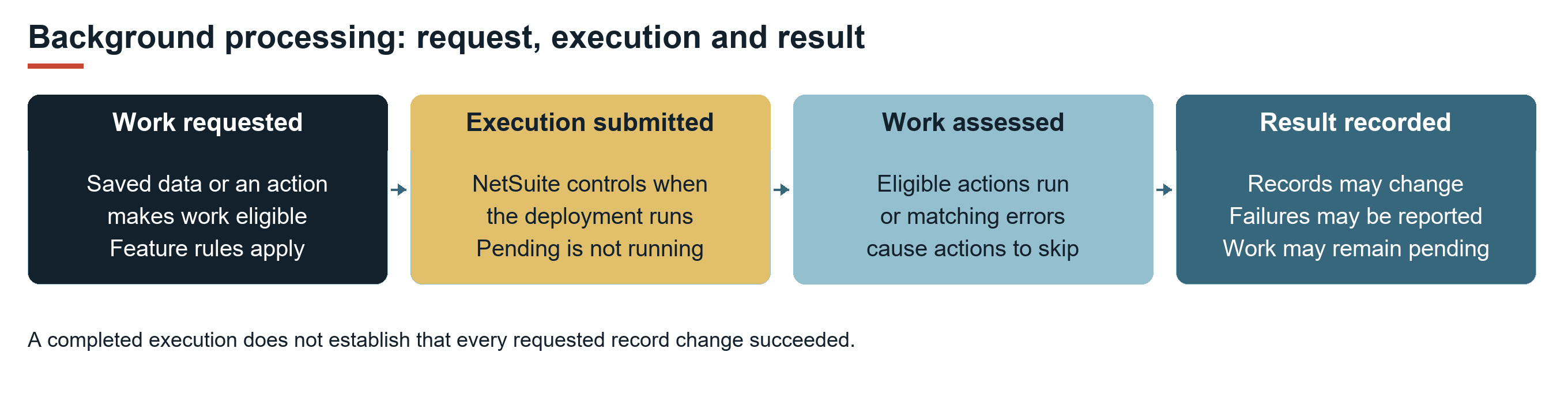
Dedicated deployments repeatedly assess eligible work and process the resulting actions. When an assessment returns no actions, the execution finishes. If execution reaches its time or remaining NetSuite usage budget during a batch, it requests another execution. If every action in a fully examined batch is skipped because of an unrecovered matching error, execution logs Blocked and stops.
The default time budget is 60 seconds for the dedicated execution loop, including assessments and action handling. This budget does not apply to individual records or queue waiting time. It does not guarantee that a specific number of records will finish. The runner checks the budget before each action. An action already running can extend the elapsed time beyond the budget.
FSM submits processing requests to NetSuite. A request does not guarantee an immediate start or a separate queued execution for every record save. Work that remains eligible is assessed on a subsequent execution. The relevant feature topic identifies the triggers that can request processing.
Dedicated Deployment Purposes
The following table lists dedicated deployments of customscript_nx_scheduled. The title suffix follows the supplied Field Service Scheduled prefix. Deployment IDs distinguish jobs within the shared script.
|
Title Suffix |
Deployment ID |
Purpose and References |
|---|---|---|
|
User |
|
Reserved User assessment. The current assessor returns no maintenance actions. Services handle authentication separately from this job. |
|
Time |
|
Assesses CRM tasks requesting activity-based time bills. See FSM Service Time Tracking. |
|
Work Order |
|
Deletes CRM tasks marked for deletion through related-work handling. The supplied name does not refer to the standard NetSuite manufacturing work order. See FSM Related Service Work. |
|
Contact |
|
Updates contacts associated with qualifying projects. See FSM Contact Sourcing and Synchronization. |
|
File |
|
Creates FSM file folders and removes expired temporary download folders. It does not delete all attached service files. |
|
Program |
|
Assesses Program changes on projects and cases, and the related cases and CRM tasks. See FSM Program. |
|
Status |
|
Assesses CRM task completion and status requests on cases and tasks. See FSM Case and CRM Task Status Automation. |
|
Time Zone |
|
Synchronizes qualifying service date and time data and performs applicable time zone maintenance. See FSM Service Time Zone Sourcing and Synchronization. |
|
Script |
|
Maintains configured execution roles and optional subsidiary Program deployments. See Deployment Controls and Risks. |
|
Consumable |
|
Assesses consumable billing, transaction links, and fulfillment under configured rules. See FSM Consumable Processing. |
|
Scheduled |
|
Submits the hourly maintenance jobs described after this table. It does not process every business capability itself. |
|
Notification |
|
Assesses and sends configured notifications for cases, CRM tasks, project tasks, and employees. See FSM Service Reports and Notifications. |
|
Config |
|
Applies targeted configuration maintenance and bundled updates when expected current values match. See FSM Configuration. |
|
Unbilled |
|
Assesses cases requesting recalculation of unbilled amounts. See FSM Case Unbilled Amount Calculation. |
|
Recurrence |
|
Assesses recurring cases and CRM tasks, and applicable requests for propagation or deletion. See FSM Case and Task Recurrence. |
|
Idempotency |
|
Removes expired creation-reservation records. This job is part of the duplicate-protection mechanism. See FSM Mobile Duplicate Creation Protection. |
|
Geo |
|
Maintains geolocation data under applicable geocoding and compliance settings. See FSM Maps, Geo-location and Tracking and FSM Service Locations and Geocoding. |
|
Account |
|
Initializes and synchronizes FSM account information. Submits applicable maintenance jobs after a detected product update. |
|
Asset |
|
Assesses inherited asset values and pending service-location changes on linked tasks and project tasks. See FSM Asset Hierarchy and Inheritance and FSM Service Locations and Geocoding. |
|
Form |
|
Migrates identified earlier expression forms in active configuration. It does not load every FSM Mobile form in the background. |
|
Error |
|
Redacts identified unmasked passwords in stored error payload and body data. It does not mark errors recovered or replay failed work. |
|
Language |
|
Populates missing translated names for supported FSM types and work calendars when Multi-Language is enabled. See FSM Localization and Translation. |
The hourly dispatcher submits the following jobs: Account, Config, File, Form, Geo, Idempotency, Recurrence, Script, Time, Time Zone, User, and Language. Other dedicated jobs can be requested by their feature events or other maintenance actions. The hourly schedule does not guarantee that every dedicated job runs each hour.
The supplied hourly deployment is Scheduled, with a daily recurrence that repeats every hour. The other dedicated deployments are Not Scheduled, so FSM can submit those deployments on demand. All are supplied with the Deployed box checked. Log Level is Audit, except for the Work Order deployment, which is supplied as Debug. These are product baselines. Account settings can differ.
Generated Deployments
Some operations create additional deployments of the same Scheduled script for a particular request. Case-related callbacks, for example, use IDs beginning with customdeploy_nx_case_<CaseID>_. Operation suffixes include np (new project), at (add tasks), utr (update related transaction), and uta (update tasks). A uniqueness suffix can be added. Asset-related callbacks use an asset-specific prefix, including callbacks for automatic project creation.
Generated deployments are separate from the fixed deployment list. Some callback processing supports yielding, waits for priority or deployment availability, and cleanup of completed generated deployments. This behavior differs from the dedicated 60-second assessment loop. The Field Service Module parameter (custscript_nx_module) carries the processing instructions.
Optional subsidiary Program deployments use customdeploy_nx_program_<SubsidiaryID>. The Script job maintains these deployments when both the corresponding configuration and the NetSuite Subsidiaries feature are enabled. Maintenance includes deployment creation and removal.
Errors and Skipped Work
An error indicates a problem encountered during processing. Causes can include invalid or inconsistent data, permission or configuration problems, customer scripts or workflows, external dependencies, or transient failures. Capture through an FSM deployment does not establish that FSM caused the error or can resolve it without other account changes.
Blocking prevents repeated attempts at work with an unresolved failure. Identify the affected work, investigate and resolve the cause, then check the Recovered box on the relevant error. Request processing through the applicable capability and confirm the business result.
Error Blocking
An active, unrecovered error has the Inactive and Recovered (custrecord_nx_error_recovered) boxes cleared. This state alone does not establish that the error blocks work. The relevant identifiers must match, and the work must still be outstanding.
The following table distinguishes action blocking from record exclusion.
|
Mechanism |
Matching Fields |
Processing Effect |
Time Dependency |
|---|---|---|---|
|
Action blocking |
Deployment, Action Type, and Action Payload on an active, unrecovered error. |
The shared runner skips a matching action unless its retry rule permits another attempt. Other eligible actions can run. |
Elapsed time can permit another attempt only for actions with a matching delayed-retry rule. |
|
Record exclusion |
Deployment, Record Type, and nonempty Record Id on an active, unrecovered error. |
Applicable assessments omit affected work before generating actions. A capability can derive related records from the error references. |
This check has no age-based expiry. The action retry delay does not release the exclusion. |
The matching fields are defined in Field Service Error Record. A recorded error is not a fixed severity classification. Its importance depends on the outstanding work it affects and the business consequences of incomplete work.
Delayed Action Retry
For the actions in the following table, a matching error can permit another attempt 24 hours after its recorded Date (custrecord_nx_error_date). The runner compares that date with the time recorded at the start of the execution. This makes the action eligible for a later attempt. It does not schedule the attempt or guarantee success.
|
Deployment |
Action |
Error Name Rule |
Behavior |
|---|---|---|---|
|
|
|
Any nonempty error name ( |
The matching action can be attempted when the error is at least 24 hours old. |
|
|
|
Exactly |
These task actions can be attempted after 24 hours for that error. The rule does not permit delayed retries for other recorded errors. |
|
|
|
Any nonempty error name ( |
These actions can be attempted after 24 hours when encountered by the shared runner. |
The Status task actions separately treat DUP_RCRD as ignorable. The dedicated runner also treats recognized record collision errors (RCRD_HAS_BEEN_CHANGED and CUSTOM_RECORD_COLLISION) as ignorable. These failures are deferred without creating a Field Service Error record through that catch path. This behavior differs from waiting for a stored error's retry delay.
Actions without a delayed-retry rule do not become eligible simply because the matching error is old. For example, the supplied case status actions do not share the task actions' UNEXPECTED_ERROR retry rule. Retry eligibility applies to a particular action rather than every operation in its deployment.
The 24-hour interval is the current supplied baseline. It is not a documented customer setting. A later successful attempt does not establish that the earlier error was marked Recovered.
Record Exclusion Without a Time Limit
The following table lists deployments that use affected-record errors to exclude work from applicable assessments.
|
Deployment |
Error Scope |
Related Capability |
|---|---|---|
|
|
Case errors directly, and sales order and consumable errors through related case links. Derived cases are excluded from relevant linking, billing, and fulfillment assessments. |
FSM Consumable Processing |
|
|
Project errors directly, and case and CRM task errors through company or project links. The derived scope can exclude the project and linked case work. |
|
|
|
Recurrence definition errors directly, and case and CRM task errors through recurrence links. The definition is excluded from applicable propagation, forward-series, generation, and deletion assessments. |
FSM Case and Task Recurrence |
|
|
Case errors for record type |
FSM Case Unbilled Amount Calculation |
Program error matching uses the applicable subsidiary-composed deployment when present. For Recurrence, individual assessment branches differ.
An error on one record can affect related work beyond that record. Correcting a field does not automatically remove the stored error from exclusion checks. Other matching active, unrecovered errors can continue to exclude work after one error is recovered.
Changes to consumable inventory searches or recorded stock details can contribute to downstream processing failures and related case exclusions. An override does not necessarily cause a failure. Its effects depend on the billing and fulfillment design, item requirements, and account requirements. For these risks and choices, including disabling automatic fulfillment, see Configuring FSM Consumable Processing.
Error Recovery and Processing
The Recovered box records the decision that an error has been addressed. Checking this box permits work to be reconsidered without matching that report's unrecovered state. It does not repair data, reverse partial changes, request script execution, or confirm that the business operation succeeded.
Investigate and resolve the underlying problem before checking the Recovered box. Correct the cause or obtain the necessary correction, then check the box and request processing through the capability's supported mechanism. Pending work must still meet its normal selection conditions.
A correction can involve account data, permissions, configuration, a customer customization, an external dependency, or FSM itself. Repeatedly recovering errors does not correct those causes. If the problem remains, the action is likely to fail again when attempted.
Processing Attempts During Investigation
During investigation, you can check the Recovered box and request another processing attempt. If selected work is dispatched and fails through a reporting handler, FSM can create another Field Service Error record. That record has a different internal ID and timestamp. Sort the list by Date, with the most recent reports first, to compare the current failure with the earlier report.
This does not move or refresh the earlier error record. Another report is not guaranteed. An unrecovered error can still block the action, or an exclusion can prevent assessment. The record might not meet other eligibility conditions, or an execution might not run. A captured failure provides current evidence of the problem. Compare its action, record, and message before deciding whether the failure has the same cause.
Before requesting another attempt, determine which changes have already succeeded. A failed operation with multiple steps can leave saved business records or transactions. Repeating the operation without understanding its result can duplicate or otherwise change business data. Capability-specific constraints still apply.
Retain the original error details and distinguish an investigative attempt from a confirmed correction. Checking the Recovered box does not establish that the cause was resolved. Confirm the intended business-record result after the attempt.
Interpreting Execution Results
The following table explains execution evidence and its limits.
|
Result Evidence |
Interpretation |
|---|---|
|
Skip log for an unrecovered error |
A matching error prevented dispatch. This log does not prove that the action ran. |
|
Blocked log |
All assessed actions were skipped. This outcome stops execution without requesting another one. A time or usage limit reached earlier can produce a separate continuation request. |
|
Complete log with no remaining assessed actions |
Assessment returned no actions. Error exclusion can omit outstanding records, so this does not prove that every business record was processed. |
|
Error older than 24 hours |
Age alone is insufficient. The action needs an applicable error-name retry rule, a later execution, normal eligibility, and no other preventing condition. |
|
Recovered box checked |
That report no longer matches the unrecovered condition. This is not evidence of data correction or successful processing. |
|
Another error after a processing attempt |
The reporting path captured another failure. Use its current context and the business-record result to interpret the attempt. |
An account with many error records can contain historical failures, failed requests, temporarily blocked actions, and records still excluded from processing. Total error count does not establish the amount or importance of currently blocked work.
Marking an error inactive also changes how some processing checks treat it. This does not establish that its cause was corrected or that omitted work completed.